SOA Services Abstraction

There are many ways to conceptualise SOA services within an enterprise, and there are many ways to organise the implementation units. Here is an illustration of the SOA services architecture of a recent client. I think it is a tidy model, but as in my recent post on governance, “Rhema Bytes: Governance a Rope that Holds Development to Architecture?”, one must bear in mind that a model is only as good as its implementation. Furthermore, every model needs evolution and in the medium term, managing constructive change can be difficult, or disastrous. The devil is in the detail.

What is described here is a high-level view of a canonicalisation context, and it is very similar to Oracle’s AIA. The basic idea is simple. Having disparate clients and partners, a business needs to expose a platform of services, with the minimal set of technologies, components and patterns. The aim is to deliver the fewest generic patterns required to manage the boundary, and the implementation of internal functions. Whatever the design or model, every day use will throw up issues that require consideration. Not everything will fit any model. There will be calls for a dispensation for non-compliance, temporary exemption and technical debt; or changes to the model where inadequacies or incongruences are discovered.

It is useful to reference the post, “Rhema Bytes: The Business to SOA Nexus”, where the discussion was on core services that a business offers, and the automated processes that realise those services. To recap, the post identified business processes as a key focus of IT, and their implementation as the automation of business services. These automated business processes (BP) are the primary targets for the clients of the eBusiness. Most other services will normally be subsumed within the lifecycle of these business processes – with some exceptions. The BP is at the top level of the abstraction model under discussion here.

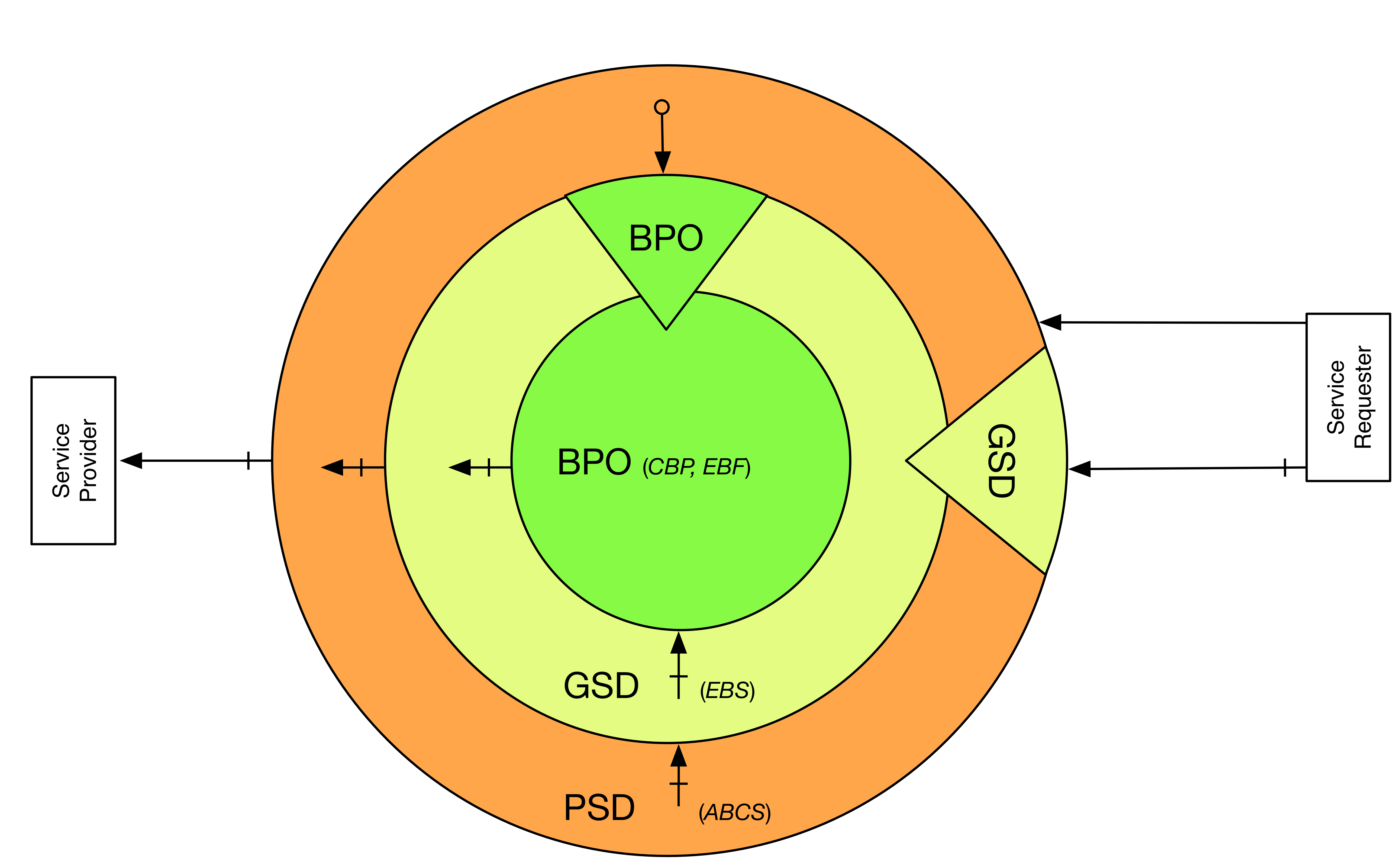
The diagram below provides an overview, with some AIA mappings:
SOA Zones with AIA Mappings

The genres of service shown in the diagram are described below:
BP – Business Processes (composite, long-running, process-centric, use cases)
Facilitates integration with core services and business, but is never accessed directly
Groupings: Process, Utility
AIA Equivalent: CBP, EBF
GS – Generic Services (composite or atomic, use cases)
Primary path into the enterprise for partners and integrators
This is an intermediation layer that decouples the enterprise from external systems
Types: Atomic, Composite
Groupings: Process, Data, Utility
AIA Equivalent: EBS, EBF
PS – Primitive Services (atomic use cases)
The only route outwards from enterprise
Secondary path into the enterprise – in addition to the GS
Types: Wrapper (BP), Adapter (GS), Mediator (partners), Facade (internal apps)
Groupings: Process, Data, Utility
AIA Equivalent: ABCS

BPs are the typical target for end users, especially human clients. However, there are exceptions, e.g. utility services, where a simple or business-agnostic use case delivers some value. Another example is for system integrators that compose existing services into new mashups. In such scenarios, it would be superfluous to add the overhead of a process. A BP must not be directly accessed by a partner. That would represent an unacceptable level of coupling between the enterprise and partner systems. Instead, BPs are accessed through an intermediary service; the details of that kind will follow in short order.

Partners that are involved in the value/supply chain may find it expedient to integrate directly with lower level services. In this case, the generic services (GS). This à la carte access is a complement to the prix fixe integration at the BP layer that is available to B2C and other clients. This option is of particular benefit where there are incongruences between internal order of tasks in equivalent processes.

Generic services (GS) are the default intermediation layer. GSs aggregate lower level services into functional components (data/process/utility), and serve as a facade for all underlying service units. GSs stand between the enterprise and partner systems and also decouple services internally. A GS will provide services to BPs and peer GSs from other groupings. A GS can be atomic or composite, depending on the number of lower level services that are involved in its value chain.

At the lowest level are the primitive services (PS). These are the gateway to the outside world. There is only one way out for requests emanating from the enterprise, and that is through the PS. The PS is the canonicalisation frontier for the enterprise; all, or most, mediation occurs here, be it data, protocol, security, transport, etc. Like the ABCS in AIA, PSs will convert from an application-specific schema to the canonical schema using custom EBM/EBO equivalents. The PS is also similar to the ABCS in that it normally routes requests to other services through the GS above it.

Partner (client) systems do not normally integrate inwards via a PS. Instead requests should are routed to the canonical GS layer. In most cases, this rule is good, but there are exceptions, due to significant differences between the types of PSs:
PSM – the default; this is a general purpose mediator to a partner system
PSF – a facade; this is wrapper around an internally developed application
PSA – an adapter; this facilitates a partner to access a service in a non-standard way
PSW – a wrapper; this simply puts a thin, non-active, decoupling layer over a BP

While the great majority of integration scenarios will be covered by the PSM variant, the other three break the rule. Either because they introduce a secondary PS layer (PS-to-PS) or that they facilitate access to the enterprise directly – (PS-to-BP), (PS-to-App).
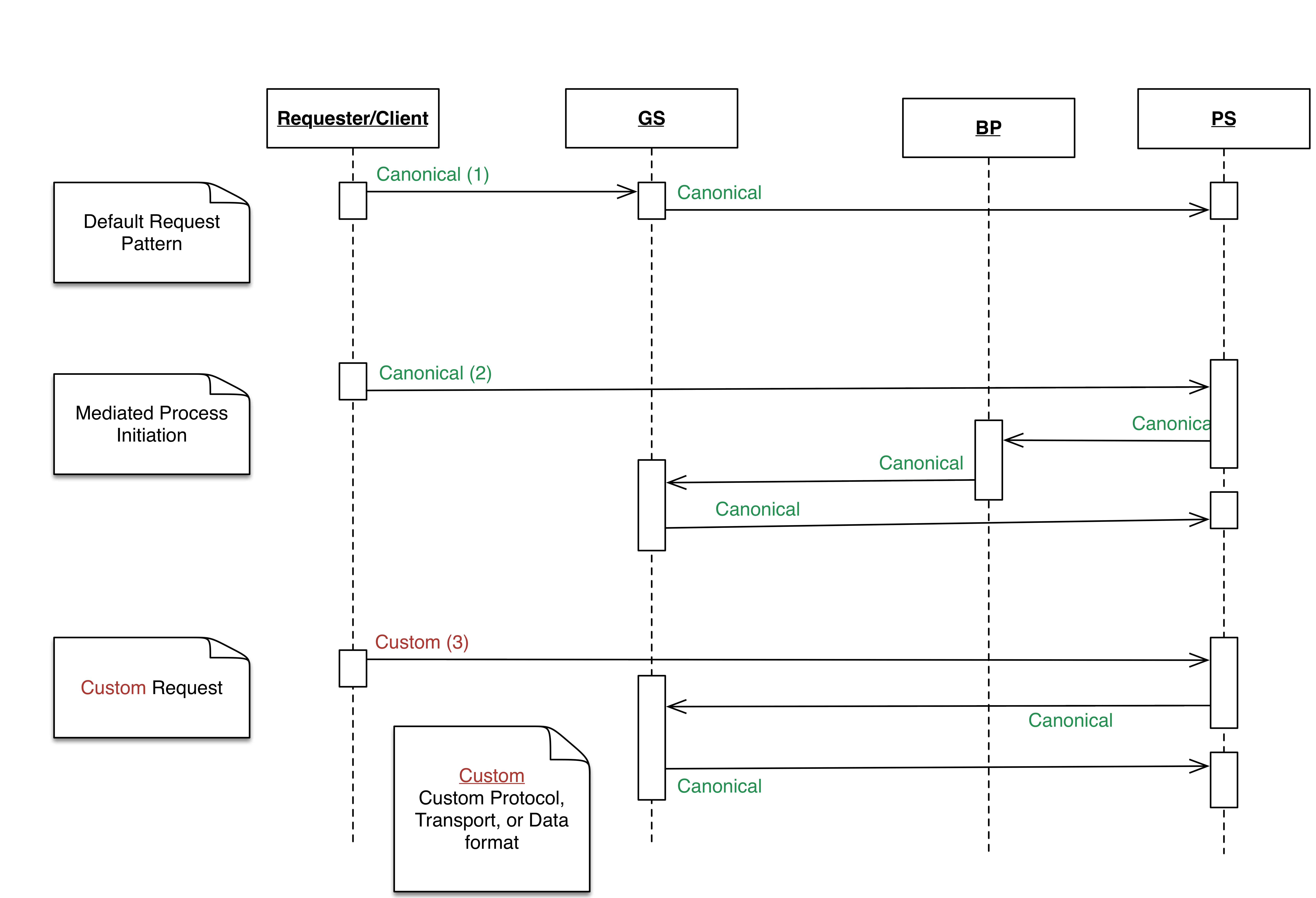
SOA Services Abstraction Sequence Diagram - Requester

The model is similar to Oracle’s AIA, but there are a few differences. Incoming requests go through a generic interface, rather than an application-specific interface, as this cuts down the number of services – see exceptions above. Also, a request to a BP only goes through canonicalisation in a PS before it is directly passed on to the BP. Another difference is in the schema design; this model uses lightweight, flatter EBOs and very strict EBMs that constrain data domains. The end result though is the same, although each approach has its strengths and weaknesses.

SOA Services Abstraction Sequence Diagram - Provider

These service genres have clear functions which are not elaborated here, and there are preferred technologies for realising each one. The characteristics of the interface of each genre and the interaction patterns between genres are also largely predetermined.

In another article, “Rhema Bytes: A Factory Approach to Service Engineering”, the velocity and efficiency gains of automation is examined. This model is useful as a basis for creating templates or a factory for concrete building blocks. Each template is preconfigured with defaults for all the functional aspects of its type/class, and can be easily configured by developers to fit specific use cases. This has great value, especially for dispersed teams; it gets the horse to the river, quickly and easily. Of course the next challenge is to get it to drink 🙂 But that is a tale for another day!


Oyewole, Olanrewaju J (Mr.)
Internet Technologies Ltd.
lanre@net-technologies.com
www.net-technologies.com
Mobile: +44 [0] 793 920 3120
Simple Canonical Schema For Maturing SOA

In a previous article (Custom XSD Schema…) I examined the options open to the information architect when deciding on the adoption of XSD schema for SOA service messaging, and whether to choose an industry/community standard or go for a bespoke design that is tailored for the organisation at the point in time.

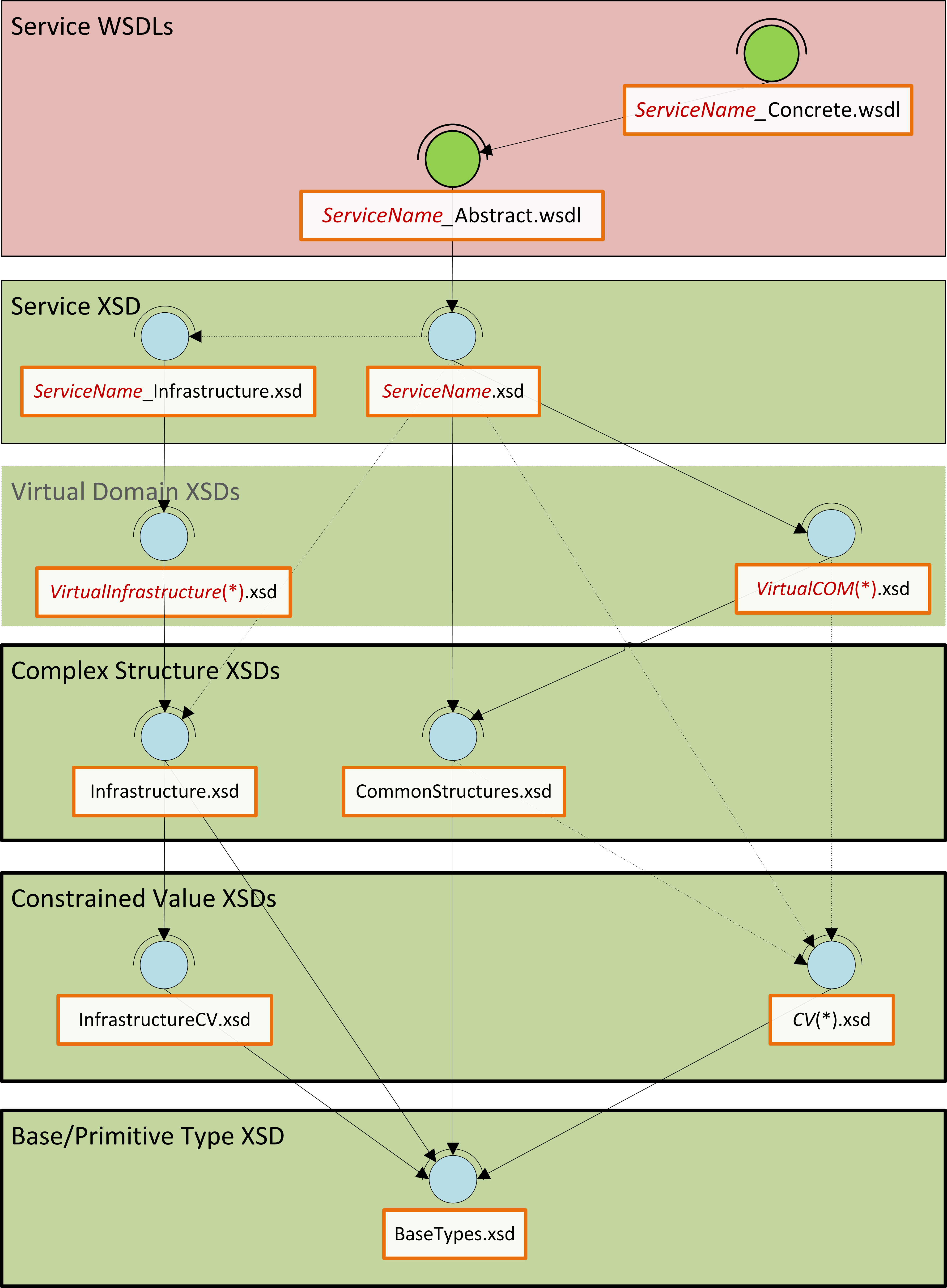
In this article, I present an overview of a custom messaging model (WSDL and XSD) that should work well for many small to medium sized IS/IT departments (10-200), especially where the information architecture function is either small or non-existent.  This model is therefore more than the canonical schema, but the minimal overhead in WSDL is necessary to create an end-to-end view of the service contract that is properly aligned.  So, to cut to the chase; let us start with an overview of the message model in the form of a diagram:

MessageModelLayers
Message Model Layers

This message model is like one of those nice layered cakes that you get at birthday parties, each layer has a different flavour and character, and the higher layers sit on, and depend on the lower layers.  Similarly, this model is built bottom up; each layer has a purpose and flavour that the layers above it depend/build on.

The Proper Canon: Base, CV and Complex:
At the lowest level, there are base types that constrain required XSD primitives into a few logical and physical domains.  The next layer contains the constrained value lists (enumerations), which are all constrained to one of the physical domains in the base types, and from that, define permissible values for certain static values for a generic type.

This layer introduces a peculiarity; “Infrastructure…”.  This construct is adopted for one purpose, to distinguish all non-business concepts.  In all the subsequent layers, any unit with “Infrastructure” in its name is concerned with IS/IT concepts rather than the core business.  Above the constrained values are the complex structures: these are common compound nodes with one or more child nodes/elements.  These three layers form our proper canonical schema, in that, everything in these three layers will be used as-is by all services in the enterprise.  Above this layer, we encounter a virtual layer, and then a service layer, and in these and other layers, perspective is everything; there is no single view of the world!

The Virtual Domains:
This is the virtual canonical schema.  The layer defines the template, or canonical form of all business and non-business (Infrastructure) concepts; the focus of this layer is coverage and correctness of definition and description rather than implementation, and this could be the bridge to an information model at some time.  Peculiar to this layer is the absence of constraints on the cardinality of data items; this is deliberate.  The absence of cardinality constraints makes it possible to defer this till later when development is imminent and allow all SOA services the liberty to define how the data will be used in their context.  The only proviso being that the structure and relationships of the data may not be augmented in any way, i.e. no moving, renaming, adding of nodes or relationships.

The Service Schema:
This layer becomes pertinent when implementation is about to begin; and the focus is in customising data structures from the virtual canon for specific use in the request and response of operations of services that use XML.  Much like the CV, Complex, Service, and Virtual layers, the service layer has business and “Infrastructure” units, but both have exactly the same function: to customise data from the virtual canon.  The service schema however needs to import the service infrastructure schema, since it is assumed that most services will be business focused rather than IS/IT focused, but the relationship could also be inverted in some scenarios.  For example, the data needed for CRUD (Create, Read, Update, Delete) operations will be different, and so it is useful that the interface of the Read operation is not cluttered with data that is only relevant for the Create operation.  The service schema could therefore specify only the ID of an Address for the input to the Read operation, whereas the Create will certainly not have an ID, but would need almost everything else: HouseName, HouseNumber, StreetName, PostCode, etc.

Service WSDLs:
The icing is put on the cake by the way of the service WSDLs (abstract and concrete).  This layer is included in the model to illustrate patterns that can be used to connect the data for the operations in the XSD to the operation definitions in the WSDL, and to support the premise that automation is not only plausible, but that auto-generation of service interfaces is on the radar.  For clarification; the abstract WSDL imports the service schema and is concerned only with the data structures that are needed by a service; the concrete WSDL on the other hand defines the implementation details of the service, i.e. what structures are needed for clients to access the service at runtime.

I hope this first piece has been useful; in the next installment I will build on this by introducing a new layer that will build on this foundation: Namespaces.

Ad Majorem Dei Gloriam.


Oyewole, Olanrewaju J (Mr.)
Internet Technologies Ltd.
lanre@net-technologies.com
www.net-technologies.com
Mobile: +44 [0] 793 920 3120

Test Automation With Plain SoapUI

Test Automation mit SOAP UI

Automation Illustration

Have you ever wanted to run some features that are only available in SOAP UI Pro?
Well, a little grasp of Groovy scripting can help you to simulate some of those high-falutin features
that would have cost you $$$ per year in licenses.  Here is one neat feature that I really like.

Running All Projects in a Workspace

This feature is not available in the free (community version) of SOAP UI, but the Groovy script
described in this post will do the same thing, without hurting your wallet.

Here are the steps for using the project file in SOAP UI

  1. Open or create a new Workspace in SOAP UI
  2. Add/import all the projects you want to run into the workspace
  3. Import the test harness SOAP UI project.  You can download the project file from > here <
  4. Remove any projects that are to be excluded
  5. Expand the “ExecutionHarnessExample” project and run the only TestStep – Groovy script “RunProject”

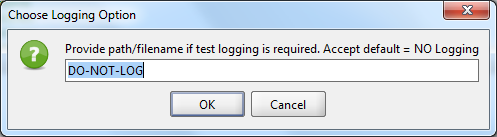
The script will loop through all the test Projects, TestSuites, TestCases and TestSteps, while also printing a summary of the progress to screen, and where indicated, logging the complete test logs to a file.  The script prompts the user for the path to the log file.  Accepting the default value “DO-NOT-LOG”, turns off logging.

soapUIDoNotLog

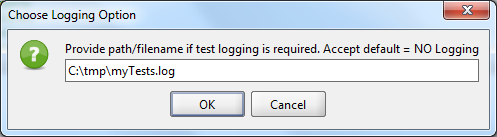
Enter a valid path to enable logging.  The name of the log file is saved to a global property, so it is available even after the test run (in case you forget)

soapUILog

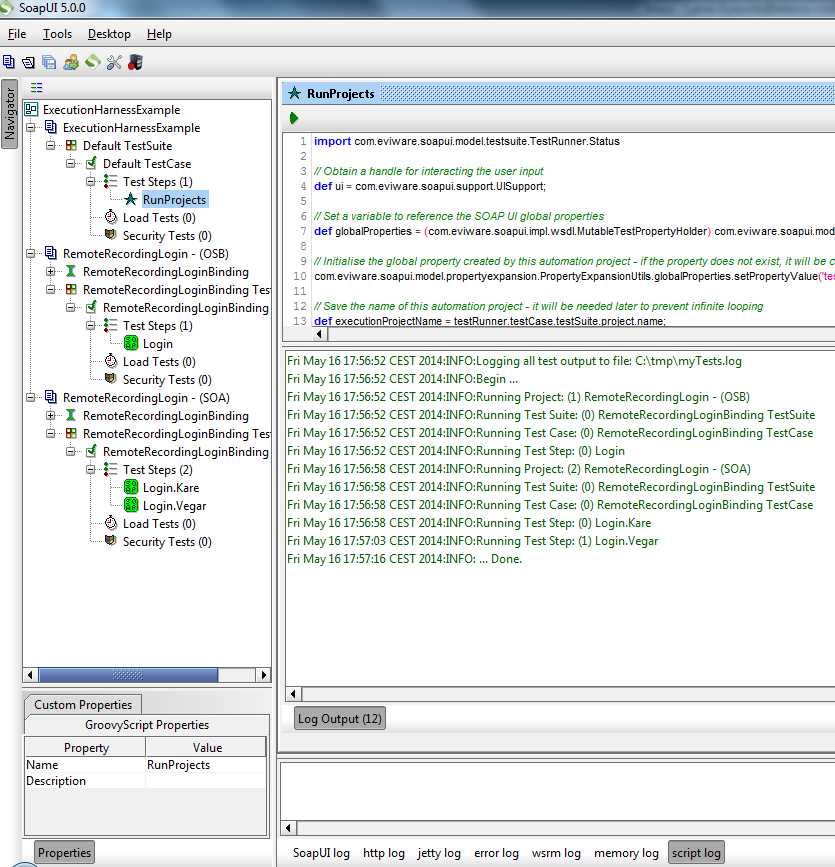
A useful feature of the script is that assertions are exercised, so you can see TestSteps turning green or red as they are being run!

soapUI2

The script is quite simple, and you can open it in SOAP UI for a detailed walk-through, but below are the salient things:

// Save the name of this automation project
//it will be needed later to prevent infinite looping
def executionProjectName = testRunner.testCase.testSuite.project.name// Get a handle on the SOAP UI workspace
def testWorkspace = testRunner.getTestCase().getTestSuite().getProject().getWorkspace();// Ask user to confirm if test output should be logged to default file
filePath = ui.prompt(…);// First, a loop is created for all the Projects in the in the SOAP UI Workspace
for (int projectCounter = 0; projectCounter < testWorkspace.getProjectCount(); projectCounter++) {// Exclude the automation project else you get an infinite loop!
if (testProject.name != executionProjectName) {// Exclude disabled TestSuites from the loop
for (… (!testProject.getTestSuiteAt(suiteCounter).isDisabled())); suiteCounter++) {// Create a TestRunner for running the TestSteps in this TestCase
testCaseRunner = new com.eviware.soapui.impl.wsdl.testcase.WsdlTestCaseRunner(testCase, null);// Run each TestStep in the TestCase
testStepResult = … testStep.run(testCaseRunner, testStepContext);// Log the output if requested
if ((filePath != null) && (filePath != ”) && (filePath != ‘DO-NOT-LOG’)) { testStepResult.writeTo(fileWriter); }// Close the output file when all Projects have been processed
fileWriter.close()


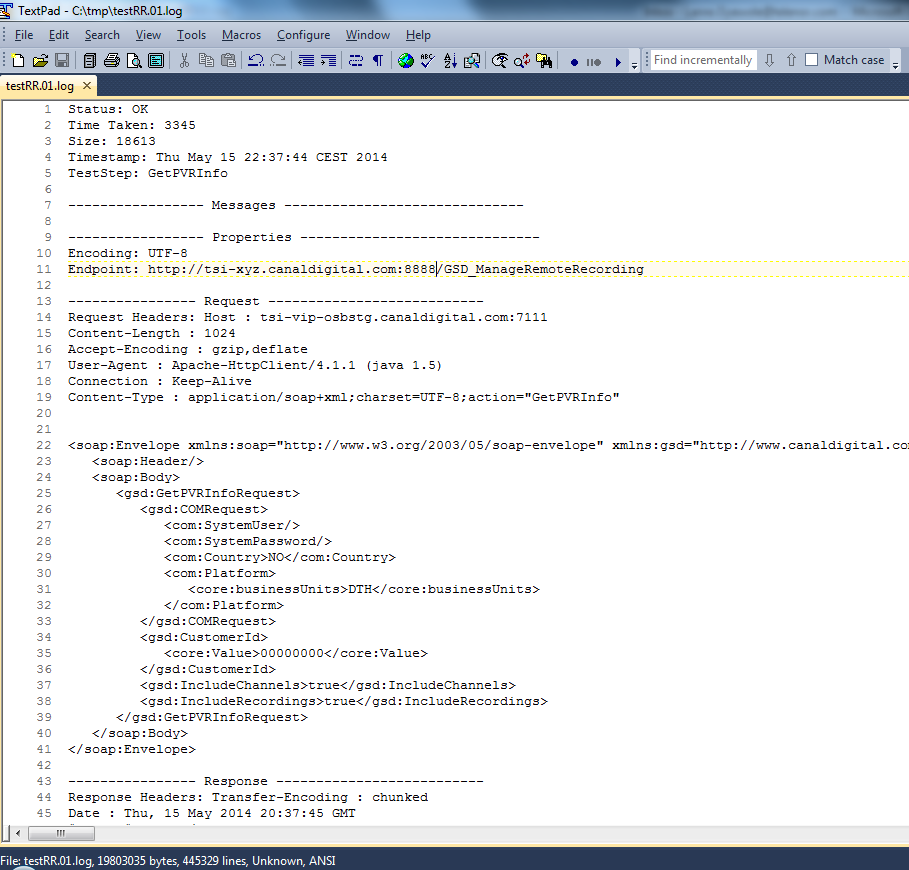
At the end of the test run, you can view the log file in a text editor like TextPad and view the messages exchanged (including headers) as well as timings.

soapUILogFile

And that’s all folks; I hope you found the posting useful.
It has certainly helped me put off the purchase of a SOAP UI licence for another day 🙂
God bless!


Oyewole, Olanrewaju J (Mr.)
Internet Technologies Ltd.
lanre@net-technologies.com
www.net-technologies.com
Mobile: +44 [0] 793 920 3120