Hands On: Installing SOA Suite on a Laptop

Installation Detail


Installing Oracle Tools on a Laptop [64-bit]


1). Install a Java 7 JDK – 64-bit version

Run the JDK installer file – jdk-7u21-windows-x64.exe


2). [optional] Install Oracle XE

There is no 64-bit Oracle XE for Windows, so 32-bit is the only option either way!

Expand the Oracle XE installer archive (OracleXE112_Win32.zip) into a folder – installHome

Start the Oracle XE installer file … installHome/DISK1/setup.exe


3). [optional] Install Oracle RCU into XE database

Expand the RCU zip file into its own directory – InstallHome

Start the RCU installation file … $InstallHome/rcuHome/BIN/rcu.bat
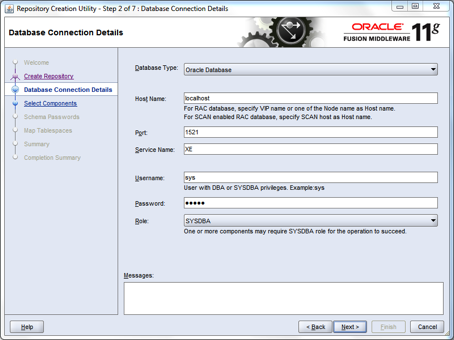
Untitled1

Fill in the details as above and click next.
An error message is displayed (see below); click on ignore

Untitled1


Select the schemas to be installed by the RCU utility – see checked boxes below
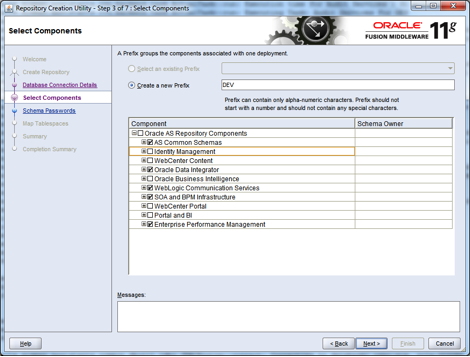
Untitled1


This should result in a successful pre-requisites check – see below.
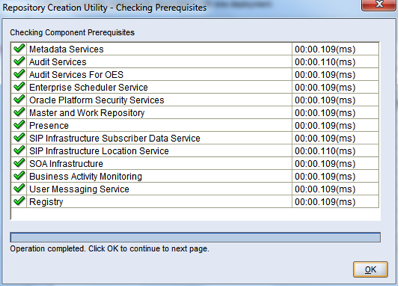
Untitled1


In the next step, specify the same username/password for all the schemas – keep it simple
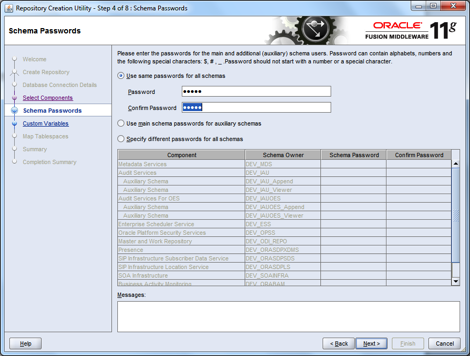
Untitled1


Use the same password on the next screen for the Supervisor and Work Repository password
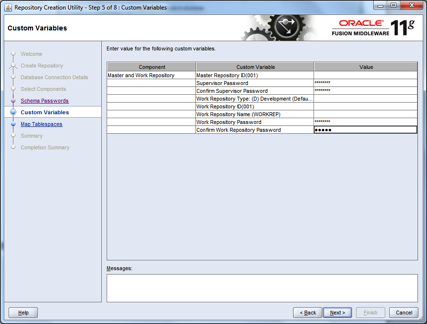
Untitled1


Accept the defaults on the next screen and just click on “Next”; when prompted about creation of non-existent tablespaces, click “OK” and continue.  Click “OK” again after the tablespaces have been created.
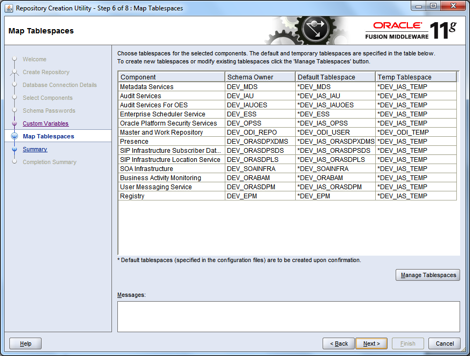
Untitled1


The next screen that appears will show a summary of the users and tablespaces that have been created, and prompt to create the data/records in the database; accept and click “Create”.
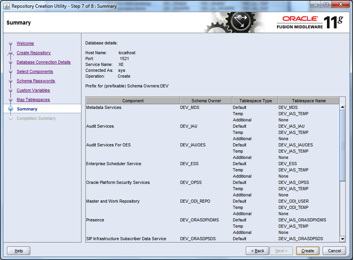
Untitled1


Ignore any errors and run the patch script (rcuFix.sql) at the end of the installation.  The rcuFix.sql script contains the statements below:

ALTER SESSION SET CURRENT_SCHEMA = dev_epm;

CREATE VIEW “ESS_FAILOVER_ACTIVE_NODE_VIEW” AS SELECT R.CLUSTER_NAME, LEASE.HOST_NAME, LEASE.PORT_NUMBER, LEASE.SECURE_PORT_NUMBER FROM ESS_FAILOVER_RESOURCE R LEFT JOIN ( SELECT LO.PORT_NUMBER, LO.HOST_NAME, LO.SECURE_PORT_NUMBER, L.RESOURCE_ID from ESS_FAILOVER_LEASE_OWNER LO, ESS_FAILOVER_LEASE L WHERE LO.LEASE_OWNER_ID = L.LEASE_OWNER_ID AND SYSTIMESTAMP < L.EXPIRY_TIME ) LEASE ON R.RESOURCE_ID = LEASE.RESOURCE_ID WHERE R.RESOURCE_NAME=’essbase.sec’ ;

ALTER SESSION SET CURRENT_SCHEMA = sys;
GRANT EXECUTE ON utl_file TO dev_ess;
ALTER PROCEDURE dev_ess.write_line COMPILE;
SHOW ERRORS;


In the next window that opens, click on “Close”
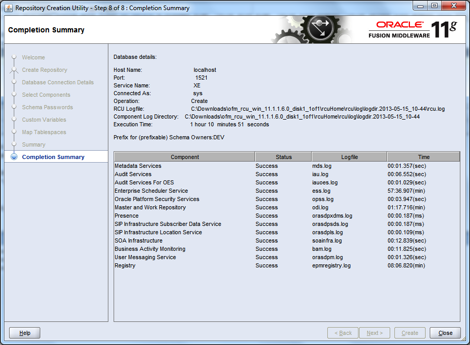
Untitled1


4). Install Oracle OEPE into a new WebLogic home

Start the OEPE installer file – oepe-wls-???-installer-11.1.1.?.0……win32.exe

Accept or specify C:\Oracle\Middleware as the new Oracle home

Untitled1


Uncheck the box to receive security updates by email and click “Yes” when prompted to continue.  In the next window, select the “Custom” install option.

Untitled1


Ensure that the “Server Examples” box is checked (below)

Untitled1

Accept the default settings in all the windows that follow and proceed to the end of the installation.


5). Apply OSB extension to the WebLogic home

Expand the OSB extension archive – ofm_osb_generic_11.1.1.?.0_disk1_1of1.zip
Open a DOS window and navigate to installerHome/Disk1
Run the setup.exe file … setup.exe -jreLoc pathToJavaJREHome
In the window (2 of 9) that appears, choose to skip the check for Software Updates

Untitled1


In the next (3rd) window, choose the existing middleware home that was created for the OEPE install (C:\Oracle\Middleware) and select Oracle_OSB as the home directory, and click “Next”

Untitled1


In the next (4th) window, accept the default (Typical install) and click “Next”

Untitled1

The next window automatically validates the machine against the requirements of the software; click “Next” to continue.

Untitled1

On the next window (6th), confirm the defaults for the Weblogic home and OEPE home by clicking “Next”

Untitled1


In the window that follows; click on “Install” to begin the installation process for the OSB extension to the WebLogic home.

Untitled1


After the installation is completed (100%), a new window opens; click “Next”

Untitled1


In the last window, click “Finish” to complete and exit the installation

Untitled1


6). Apply SOA Suite extension to the Weblogic home

Expand the first SOA suite extension archive – ofm_soa_generic_11.1.1.?.0_disk1_1of2
Expand the second SOA suite extension archive – ofm_soa_generic_11.1.1.?.0_disk1_2of2
Open a DOS window and navigate to installerHome/Disk1
Run the setup.exe file … setup.exe -jreLoc pathToJavaJREHome
Select “Skip Software Updates” and click “Next”

Untitled1


The next step is a prerequisites check; it should always succeed.  Click “Next” to continue

Untitled1


Accept or specify “C:\Oracle\Middleware” as the middleware home and click “Next”

Untitled1


Confirm the application server type and location and click “Next”

Untitled1


This is a confirmation page, just click “Install” to continue

Untitled1


After a while, you will be prompted for disks 4 and 5; edit the path as shown in the next two screenshots: …disk1_2of2\Disk4… and …disk1_2of2\Disk5…

Untitled1

Untitled1


The installation should take a few minutes to complete, click “Next” when it reaches 100%

Untitled1


The next screen is just for confirmation of what was installed; click “Finish”

Untitled1


7). Install JDeveloper

Run the JDeveloper installer file – jdevstudio1111?install.exe
Accept or specify C:\Oracle\MiddlewareJDev as the new Oracle home
For some strange reason, JDeveloper did not install into the existing middleware home!

Untitled1


Accept the default install option “Complete”.  Click “Next” to continue

Untitled1


Confirm the installation directory and click “Next” to continue

Untitled1


Accept the default access for all users and click “Next”

Untitled1

Confirm the planned installation summary and click “Next”

Untitled1


Installation takes only a few moments.  On the final page, ensure that the “Run Quickstart” button is checked, and then click “Done” to exit the install program

Untitled1


On the quick start page, select the second option: “Launch Oracle JDeveloper”

Untitled1


When JDeveloper starts for the first time, the following window is displayed.  Make sure to select the “Default Role”, and at the bottom of the window, uncheck the checkbox that says: “Always prompt for role selection on startup”

Untitled1


Another popup window appears, this time select all the boxes to ensure that those file types are associated with JDeveloper on your computer

Untitled1


When JDeveloper starts, you will be prompted to check for new updates that are available (at the right-side bottom of the screen).  If this does not happen, from the menu and select the Help submenu, and under it select “Check for Updates” (see screenshot below)

Untitled1


In the window that pops up, select the following entries:
Oracle BPM Studio 11g 11.1.1.?
Oracle SOA Composite Editor 11.1.1.?
Spring & Oracle Weblogic SCA Version… [optional]
Click “Next” when you are finished


Untitled1

Untitled1


One or more of the selected items may require a confirmation of agreement with license terms, select “Yes” to accept and continue with the installation

Untitled1


When all the updates have been applied, a confirmation page will be displayed; click “Finish”

Untitled1


A popup box appears, prompting a restart of JDeveloper; click “Yes” to accept

Untitled1


8). Create a WebLogic domain with OSB & SOA Suite extensions

To enable the running and deployment of services locally on a PC or laptop, a WebLogic domain must be created with support for these features.

From the Quick-start screen (see page 20), select the first option: “Getting Started with WebLogic Service 10.3.5”, and the following screen appears.  Select “Create a new WebLogic domain” and click “Next” to continue

Untitled1


Ensure that the options selected below are all checked

Untitled1


On the next screen, accept the defaults and click “Next”

Untitled1


Set the administrator username and password to, “weblogic” and “welcome1”, respectively

Untitled1


Accept the defaults for “Development Mode” and “Available JDK”

Untitled1


For the JDBC options, check all the boxes and then use the values below for, Vendor, DBMS/Service, Host Name, and Port.
Set the password as you choose, and select the Oracle driver for the Driver option

Untitled1


The next step validates the JDBC configuration, this should all run successfully!

Untitled1


Check the boxes for “Administration Server” and “Managed Servers, Clusters and Machines” to fine-tune your installation in order to reduce the disk, memory and maintenance footprint

Untitled1


Accept the default name and port for the admin server, but check the box for “SSL enabled” and click “Next” to continue

Untitled1


The next window opens with a summary of the installation that is to be performed, click “Create”

Untitled1


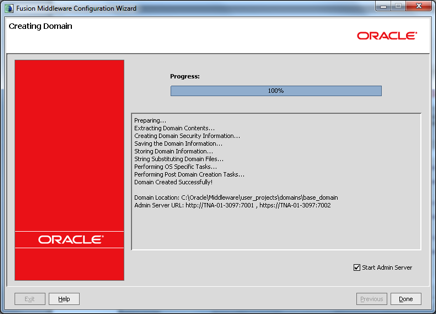
The install should take a few minutes, after which the summary page shows 100% progress.  Check the box for “Start Admin Server” and then click “Done”.  That’s it!

Untitled1


Oyewole, Olanrewaju J (Mr.)
Internet Technologies Ltd.
lanre@net-technologies.com
www.net-technologies.com
Mobile: +44 [0] 793 920 3120

Custom XSD Schema or Public Standard: Some Perspectives

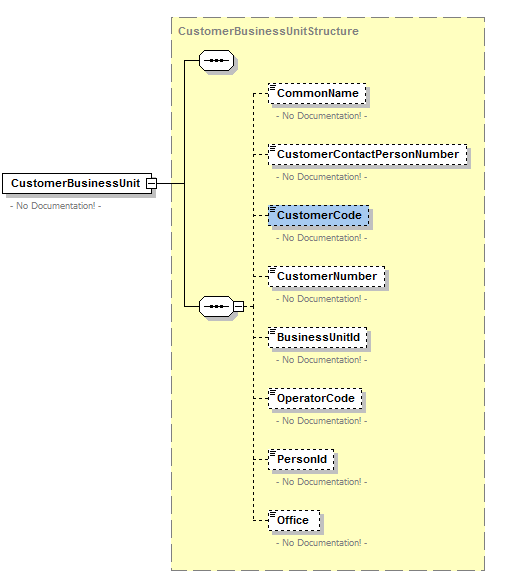
XSD Schema Sample

XSD schema are a key part of the inteface exposed by Web Services to enterprise and external clients of services, however, organisations need to decide how to go about deriving the schema that will be used by their services.  The choices are simple, either adopt an external standard such as OAGIS, HL7, etc. or create/reuse an internal standard.  Making the choice is not so simple though, and benefits from consideration from a number of perspectives.

This is an “insight” post; it aims to stimulate discussion around the subject it discusses; these articles may appear prescriptive and perhaps dogmatic, but the objective really is for debate that leads to reusable knowledge and that is accessible to the wider community of software engineers in the area of focus.

Due to IPR constraints, the full text of the document that informed this article is not yet available for public access – the essence of the document will be synthesised and made available in the very near future.

There are three things to bear in mind when deciding on the sourcing of XSD schema:
1). The purpose of your message architecture – what vision is it going to support
2). The technologies available to you
3). The size of your team

The first and most important is the architectural vision that you are working towards. If your goal is to facilitate B2B collaboration with business partners, then you have little choice than to investigate if the partner community already has a canon that they use, be it OAGIS, HL7, NIEM, or some other standard, then it will be wise that you simply take the hit and negotiate the resource issue with management and HR. If on the other hand the vision is primarily to support a domain or enterprise SOA, or if the organisation is just exploring SOA adoption, then you should consider creating your own canon; ideally derived from your enterprise/domain data model(s).

The second key issue is technology. You will need dedicated tools for working with public standards like OAGIS, as the schemas tend to be quite complex and will usually involve some customisation (extension and/or restriction) to get it to work for your own context – not everything that partner-A wants is useful to partner-B. On the other hand, if you make your own canonical schema, they can be as simple as you choose. While you could view OAGIS files using JDeveloper, Eclipse, and other developer IDEs, in practise, you would benefit from investing in something like Oxygen, Stylus Studio, or XML Spy to make the work easy and efficient.

The last, but not least, is the size and competence of your team. If your team is small and/or inexperienced, you are better off starting with your own schema, especially if you have fixed/in-elastic timescales for delivery. Learning to work with a standard such as HL7 takes time, and you may all need to attend courses to understand the structures employed and how to adapt them for your context and use. Experienced staff will obviously learn quickly, and may be able to read up on existing documentation and online examples as an alternative to formal instruction. Less experienced personnel, and young developers may struggle though, and this could end up in a person/group that designs schema and another group that are told how to use them!

Whatever way you decide to go though, standard or custom, you will find help with tools such as IgniteXML or consultants/consultancies that specialise in standard (OAGIS, UBL, HL7, etc.) or custom (canonical and other) schema design and development. It is an important area though as it is a neck that aligns the view of data from SOA service interfaces and IT, with that of the business and client community. The decision made (industry standard or bespoke) is vital; in an Agile context, a wrong turn here could severely impact the velocity of Sprints, so time invested before making a decision will be well spent.

If the decision is to create a a canonical schema for the domain/enterprise/centre-of-excellence, then the following advice will be useful:

  • Always begin with an information model (domain, or enterprise) a.k.a domain/enterprise inventory
  • Derive a canonical schema from the information model
  • Choose between using a virtual or physical canonical schema
  • Keep the initial canonical schema small and simple
  • Leverage conventions like document literal wrapped
  • Do not try to replicate the information in the service interface, especially the input
  • Make a clear distinction between business data and non-business/infrastructure data
  • Apply namespaces as a governance tool rather than a design tool


Oyewole, Olanrewaju J (Mr.)
Internet Technologies Ltd
lanre@net-technologies.com
www.net-technologies.com
Mobile: +44 [0] 793 920 3120
 

SOA Lifecycle Meta Design

SOA Service Lifecycle
The service focus of SOA gives the life-cycle a special importance in the adoption and success of SOA within an organisation.  The concept and evolution of a service should follow predictable paths and be subject to predetermined controls on input, process and output. The complement of the possible paths, from the first input to the final output, describes the service life-cycle in an organisation.
When the paths that a service can take are visible, accessible and widely known, many more personnel, especially those outside IS/IT are enabled to participate, and this popular participation is key to successful alignment with the business.  Organisations need to understand the fundamentals of services and their lifecycle at an early stage of SOA adoption, and certainly before committing to service management tools. Purchasing tools for service management without the architectural vision is likely to result in a wrong choice of tools or considerable difficulty in realising expectations from the features provided by the tools.

This is an “insight” post; it aims to stimulate discussion around the subject it discusses; these articles may appear prescriptive and perhaps dogmatic, but the objective really is for debate that leads to reusable knowledge and that is accessible to the wider community of software engineers in the area of focus.

This article suggests that there are some concepts that can be interwoven to give a better understanding of service, service life-cycle, service management, and how these all inter-relate. The underlying idea is this:

  • That the management of SOA services (life-cycle) involves certain stages
  • That every stage has some input(s), processing, and output(s)
  • That the input, processing, and output involves some personnel (human action)
  • That the personnel operate in an official capacity (role), and require certain privileges
  • That the privileges enable the personnel to trigger/effect certain actions
  • That the actions alter the state of a service, along the axis of its life-cycle
  • That the enablement of all the above constitutes a kind of service management

Given these generics for a service life-cycle, it is possible to determine the interactions that can be expected in a functioning service management system. It is important to give a brief introduction of the concepts involved, and then expand on their inter-relationships.

$STAGE and $STATE
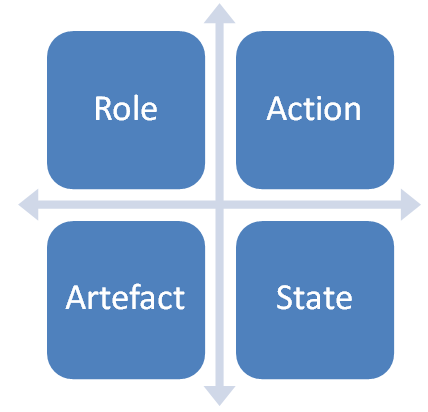
A Stage identifies high-level (composite) states that the Services in a repository pass through. Specifically, a Stage is a composite of multiple Artefact States, as well as the range of States of those Artefacts.  A State identifies the attribute value(s) of a specific Artefact at a point in time.
Examples ::= {Conceptualise, Evaluate, Design, Develop, Use, Retire}** (STAGE)
Examples ::= {active, inactive, visible, invisible, enabled, disabled} (STATE)

$ARTEFACT
An Artefact is anything that has attributes/properties that are managed in the repository.
Examples ::= {Stage, Role, Service, Operation, Fragment, Document, Link, Communication (email, sms)}

$ROLE
A Role encapsulates responsibilities, tasks, or outcomes attached to a generic actor within the repository.
Examples ::= {Registrar, Reader, Business Analyst, Architect, Process Owner, Developer, Support}**

Privilege Matrix
Privilege Matrix

$PRIVILEGE
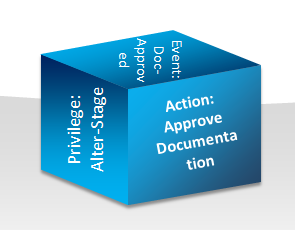
A Privilege is leverage or permission given to a Role to access or change the state of one or more Artefacts, a Privilege is really a composite that has three dimensions (Action + Artefact + State) since the Privilege must enable a Role to do something with an Artefact when at a particular State.
Examples ::= {Propose Service, Approve Service, Create Operation, Edit Fragment, Close Stage}

$ACTION
An Action is access or change to the state of an Artefact by a Role. An Action is the exercise of a Privilege by a Role.
Examples ::= {Read Service, Delete Operation, Approve Design}

$EVENT
An Event is the incidence of an Action, it is useful to differentiate both concepts though, because while the Action is proactive, the Event is reactive, the former is related to a Role whereas the latter is significant mostly for the system.
Examples ::= {Before Stage, After Stage, On Approve Operation, After Service Delete} (these are generic examples)

These concepts could be further refined/decomposed, depending on organisation size and experience, but this suffices for an illustration.
It is useful to expand on Event briefly and to define three generic Events that relate to the governance/control of the interaction between the main concepts in a service management system. These are: before-stage, during-stage, after-stage.


For each Stage in the life-cycle, there will be an Event that identifies the State of the service before, during, and after the Stage. Usually, the after-stage Event of one (n) Stage will be the same as the before-stage Event of the next (n+1) Stage.  These events are important gateways for governance as they provide useful points for checks and changes on Artefacts and Privileges. The checks are done to ensure that state changes are valid, and that the Service is in a consistent state and it can transition to the next state without complications.
  • Before a Stage is entered/activated, it is important to check that the conditions for activation have been met in the system. Each Stage will require some input ($ARTEFACTs); before the Stage is activated, the required input(s) must present, and valid.
  • During the Stage, all Privileges needed by Roles should be enabled, so that the Stage can complete. When all pre-conditions are passed and a Stage is active, metadata should be updated to enable Privileges for the actors that manage the Stage. Artefacts required by Role(s) should be enabled and made visible.
  • After a State, Artefact States must be updated appropriately, Roles reverted, and any necessary communication effected. Metadata relating to the previous Stage should be updated, for example, certain Artefacts may need to be disabled or made invisible. This could also be a good time to Communicate the State transition for any review and to inform Role(s) involved in the next Stage.

It is important that the service management system manages the changes triggered by Events so that users do not shoulder the responsibility.

Event Relationships
Event Relationships
The Stage is the skeleton upon which everything else hangs; the example Stages above are simple but should be sufficient for most SMEs. For larger or more complex organisations, the Stages could be further refined by one or two levels to take in all the tasks and personnel involved in Service management.  It is important to say that even though the Stages are quite static, the path of services through the life-cycle will differ considerably; services may fail at any stage, be regressed, or even skip one or more Stages. The design must allow and support this.

For very SMEs it may be enough to limit the life-cycle design to Stages and Roles only. This is recommended where services are few, the organisation is small, and the processing and governance are manual.

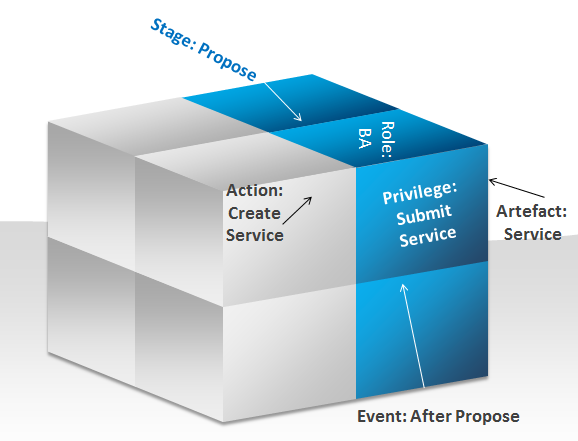
Dimensions of a Stage
Stage=Propose; Role=BA, Artefact=Service; Action=CreateService; Privilege=SubmitService; Event=AfterPropose
It is important to note that transition from one Stage to another may not always be automatic, and an Event may trigger a communication, which results in an Action, before the transition can be completed. So the horizontal relationship between Stages needs to be complimented with vertical relationships with Events and Privileges. It becomes clear that the design of the Stages there is a need to maintain a matrix that document the relationship between a Stage and the Events and Privileges active in that Stage.


Another set of metadata relates to the Artefacts used/produced in a Stage. Each Stage will require different Artefacts, and while it may sound like a good idea to combine this into the matrix mentioned above, this may not be optimal. The granularity at which Artefacts occur may be much finer than that for Stages, Events, Privileges. For example, an Event may be related to more than one Artefact, just as a Privilege may cover more than one type or genre of Artefact. All the matrices could be crafted in a spreadsheet with multiple dimensions, or visualised using diagrams that show the dimensions involved.


A useful summary of what is being presented here it this: Stages of the life-cycle show the possible transitions paths for a Service; each Stage will need some input and should have some output; the inputs and outputs should be checked before and after a stage, and personnel should be limited in what they can do to a Service at different Stages of the life-cycle. One thing that is often missed by SOA governance tools is the visualisation of the life-cycle of services; this is unfortunate, since SOA aims to align IT/IS with the business, who happen to be the ones paying for IT/IS departments.  The absence of an intuitive web/application interface shrouds service life-cycle management, and SOA governance, in a cloud of mystery and false complication. But it also impedes the participation of non-IT personnel.


Visualisation of the state of services at points in time, as well as a simplified ontology of the services will go a long way in the accessibility of SOA to the business, but also make it a lot easier for IT/IS professionals to manage the service life-cycle.  Nevertheless, there is a lot that architects can do to prepare organisations for service management. Preparation is important; no tool can make up for a lack of vision and planning by an organisation. IT leadership should invest time in thinking and articulating the vision for services, and how the services will be communicated and managed across the organisation. A meta-design such as this is useful for that purpose.
A guide is presented below for using this meta-design in the preparation for services and their management:

  1. Define the Stages, Roles, and Artefacts – keep the definitions simple
  2. Add Actions, Privileges and Events if there is organisational capacity
  3. Prepare matrices to show the relationship between Stages, Roles, Artefacts, etc.
  4. Complete a walkthrough to show how some scenarios can be played, for example:
    # New Service Creation
    # Service Update
    # Service Retirement/Deletion
    # New Service Rejected
    # Service Regression from Production to Design
    # Stage transition

There is no single correct answer, neither does this article pretend to be the only valid approach. However, identifying and discussing these key concepts {Stage, Role, etc.} and their interrelationships will help to simplify the task and help an organisation to create an effective lifecycle model that is accessible and enables participation from all those in the organisation.

Oyewole, Olanrewaju J (Mr.)
Internet Technologies Ltd
lanre@net-technologies.com
www.net-technologies.com
+44 [0] 793 920 3120

Generic Rest Gateway in Oracle Service Bus (OSB)

Generic REST Gateway

Having built up an enterprise with primarily SOAP services, from time to time, one encounters lightweight client systems that require a simple HTTP (REST) based interface to those existing services. The options were either to add another class of “Adapter” services that converted one-to-one REST-to-SOAP for the existing services, to keep the canonical pattern (SOAP interfaces in this case) and find some kind of application to do the translation. There are quite a few out there, but this is not the place to advertise their services/products.

This is an “insight” post; it aims to stimulate discussion around the subject it discusses; these articles may appear prescriptive and perhaps dogmatic, but the objective really is for debate that leads to reusable knowledge and that is accessible to the wider community of software engineers in the area of focus.

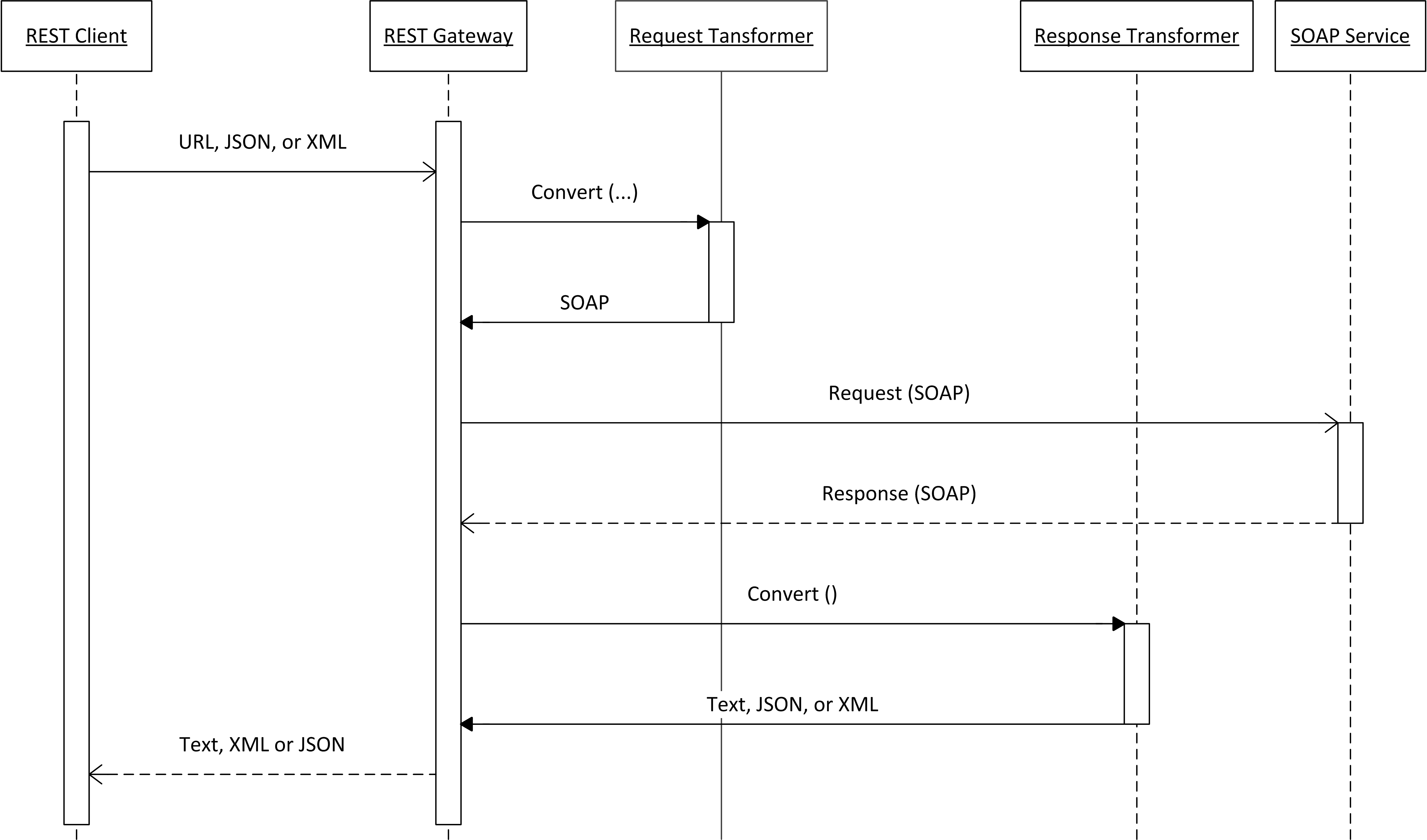
Below is a diagram that illustrates the simple design for this service.

REST Gateway Sequence Diagram
Generic REST Gatewau

The simple approach that we have adopted at my present client is to create a generic REST gateway, since these lightweight clients do not impose any unique use cases on the enterprise, their needs could be met with a standard algorithm (abstraction of the solution follows):

  1. Accept a simple HTTP GET (REST) request from an external client
  2. Transform the query string into a SOAP request message
  3. Forward the SOAP message to a defined service
  4. Receive the response from the defined service
  5. Return the response (converted or not) to the external client

The solution implementation in OSB for each step was:

1). Create a Messaging (Text/XML) proxy service with HTTP transport
2). Use dynamic XQuery to transform the request from REST to SOAP, based on query-string parameters:
serviceName=???
serviceVersion=???
operationName=???

The combination of serviceName, serviceVersion and operationName can be used to dynamically select the appropriate XQuery to use for converting the incoming request from REST (URL, XML or JSON) to a SOAP request.  The same combination is then used to locate an XQuery to reverse the transform, i.e. from a SOAP body to a simple XML or JSON structure.

3). Use dynamic routing to forward the output of the XQuery to the target SOAP service
4). Receive the response from the SOAP service
5. Use dynamic XQuery to transform the response from SOAP to REST, based the on query-string parameters

This solution took only a few hours to develop, and can be used for any service, as long as:

  • The required XQuery resources for converting from/to SOAP have been created
  • There is an algorithm or mapping table for determining the URL of the target SOAP service from the input parameters

For sites that are waiting for the release of Oracle 12c and the promise of a REST gateway, this handy service can be used as a stop-gap solution.
See attachment for a sample project that implements this concept.

GenericRESTGatewayV1


Oyewole, Olanrewaju J (Mr.)
Internet Technologies Ltd.
lanre@net-technologies.com
www.net-technologies.com
Mobile: +44 [0] 793 920 3120