Cloud Migration and Availability Index

Infrastructure Migration

The Cloud Transition

The Cloud may not be in-your-face.  But it is pervasive, and gradually taking over many aspects of our traditional IT systems. Companies are not yet making wholesale transitions from existing data-centres and on-premise assets to Cloud. However, when infrastructure reviews occur, whether to upgrade or add new resources, the Cloud beckons. Questions about total cost of ownership (TCO), scalability, time-to-market, etc will influence decision makers.  For each one of these, the Cloud offers a compelling alternative. It is likely that in the next two decades, only a few companies will still maintain their infrastructure on premise.
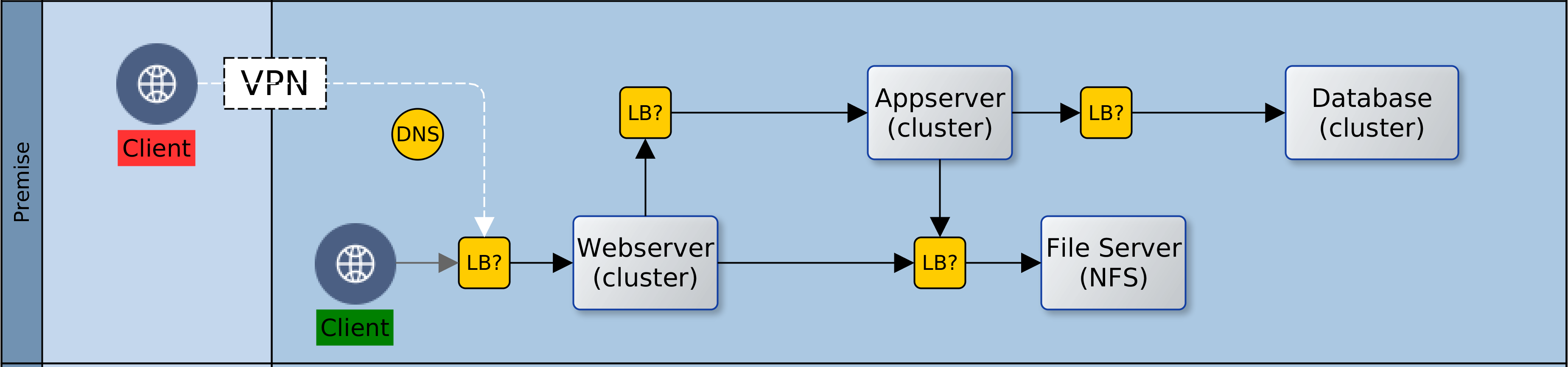
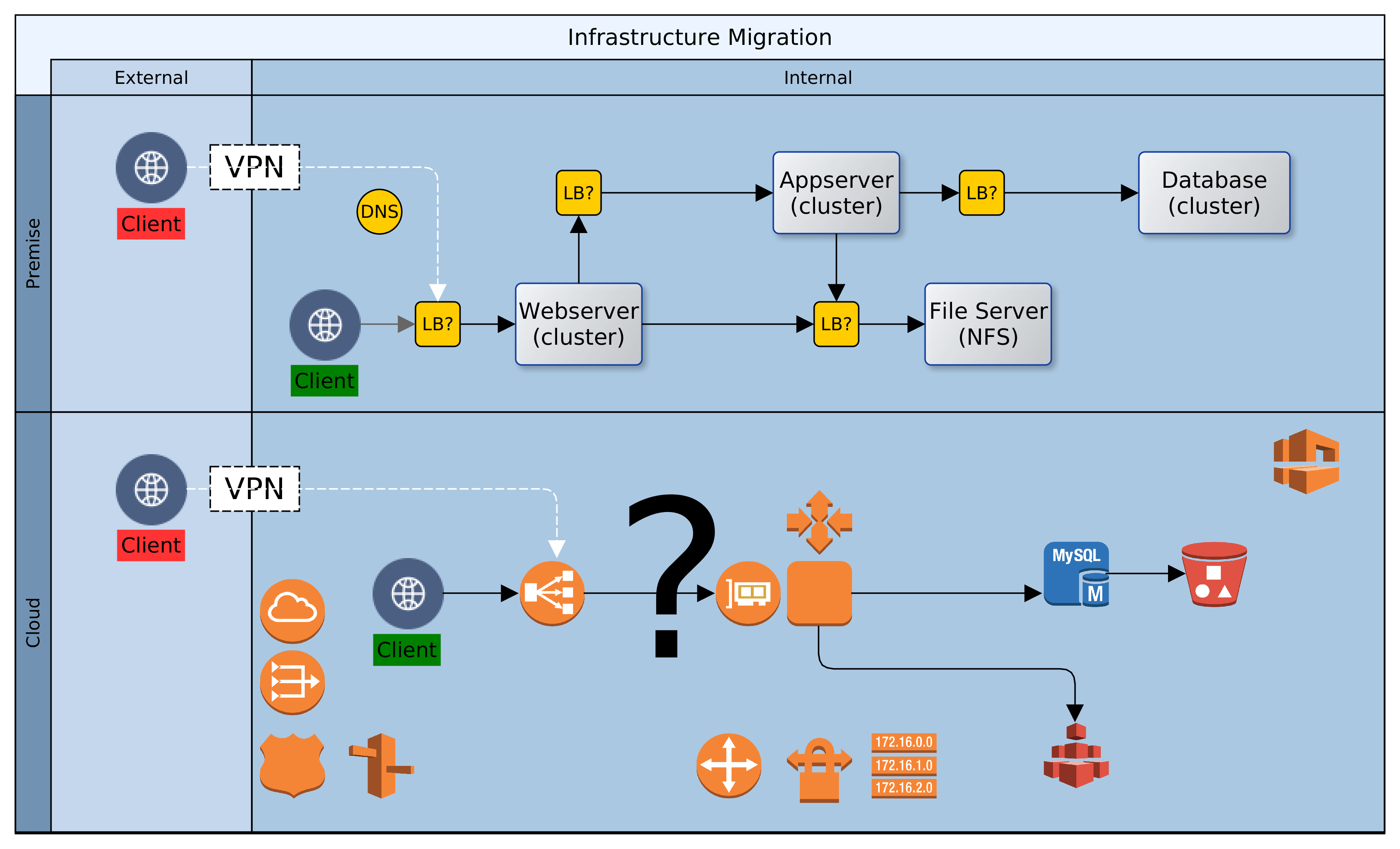
The Status Quo - On-premise Deployment Design
Let us assume then that ACME plc has made a decision. Business has been persuaded, either by hype or fundamentals, that the Cloud is the strategic target. Architectural leadership has been mobilised and a decision taken to draw up a roadmap for Cloud adoption. What next? In this article, we look at four primary considerations that architects must carefully examine when migrating to the Cloud. These are: sizing, failover, scaling and access. Everything else builds on the foundation that is synthesised from these four dimensions.

Sizing: What Specification of Infrastructure Should be Provisioned

Statistics are invaluable. Node sizing should be empathetic to existing use profile. It may be okay to guess at first, but it saves so much time to know in advance. For each Cloud instance, the node(s) provisioned should be selected to meet latency and throughput required to support 120% of anticipated production load. The sizing could be either singular or plural. Singular, as in one node with enough capacity to bear all load; or plural, i.e. a number of nodes that can, between them, satisfy demand. But the baseline should exceed the present need.

Resizing in the Cloud may be quick and easy, but the decision making might not be so. If in doubt, over-provision. It is easy to downsize later, and the organisation avoids the risk of loss of business due to performance or availability problems. Default sizing is simple, i.e. geography localised and singular. But there could be exceptional scenarios where geographic distribution must be combined with plural sizing. More about that later.

Failover: How is System Failure Mitigated

Given proper sizing, as above, the next dimension to consider is failure and recovery. If or when a properly sized machine fails; what happens next? Let’s take the simple approach first and we will revisit this later. There should be a distribution of node(s) across Cloud locations, so that the failure of one node does not result in service unavailability. Service recovery should occur in a different Cloud location. This reduces the likelihood of contagion from the original failure location while maintaining service continuity. An interesting aspect of failure management is implicit resilience, i.e. what measure of interuption can our infrastructure handle?

The complement of the nodes that provide a service across Cloud location(s) is a resource group. The group resilience is the count of simultaneous failures that can be managed while maintaining SLAs. The higher the count, the larger the number of nodes and Cloud locations involved. Resiliency has a price tag though. More machines (virtual) will multiply cost and increase the percentage of idle/redundant resources in the Cloud platform.

Scaling: How are Additional Resources Provisioned

As resource demand grows organically, or due to unexpected spikes, infrastructure should respond, automagically! Traditionally, scaling was a bureaucractic and technical journey. With Cloud, scaling is merely a change of configuration. Where singular sizing has been used, another node of the same size could be added. This is horizontal scaling. Adding more nodes to singular sized nodes would multiply capacity. It is linear, but there is no guarantee of commensurate increase in demand or resource usage. There is an alternative design that is more efficient: programmatic vertical scaling. A simple algorithm can be applied to automatically scale resources; up or down, by a fraction rather than a multiple.

Cloud platforms record a raft of events about the resources deployed. Customers can tap in to these events to scale in response to demand. On AWS, CloudWatch alarms can trigger a Lambda function, which in turn effects a rolling upgrade on EC2 nodes; upscaling node size before autoscaling. By leveraging statistics for baseline sizing and monitoring demand, we can guarantee day zero availability and decent response in infrastructure provisioning. Increasing capacity as demand grows and shrinking it if or when spikes even out.

Access: How do Clients Connect to Cloud Services

The fourth dimension is access. As on-premise, so also with Cloud. There is no value in having resources that are locked away from everyone and everything. Our clients need access to our Cloud based services, so also partners involved in our service chain. Unless we are migrating all at once, it is likely that we will also need access to some on-premise infrastructure. Our design must provide the access paths and levels, as well as the constraints that keep authorised clients within band and everyone else out. To achieve this we would use such facilities as the Virtual Private Network (VPN), the load balancer, firewalls and others. Beyond the basics of who’s in and who’s out though, there is a service that we must provide to clients and partners.

The key here is to be simple and unobtrusive; placing minimal burdens on clients, partners and our applications/services.

By default we would use load balancers to decouple clients from service providers. Cloud load-balancers spread requests among available service providers. They are not geography specific and simplify access and security for clients and service provider.  Our Cloud landscape is elegant and uncomplicated, with singular entry points for each service.  One consideration could however force radical change to this default: Geographic Affinity (GA).  Geographic affinity is a requirement to pin clients to a specific physical/geographical service provider.  It could be zonal or regional. GA is often driven by regulatory, localisation, performance or security concerns.

But some GA drivers can be conflicting. For example, performance (latency sensitive applications) might be a problem where localisation (regional) is required. Invariably, GA tilts our architecture towards plurality of nodes and complications in managing performance and synchronisation of state. Architects must balance, sometimes conflicting, needs to avoid creating virtual silos in the Cloud.
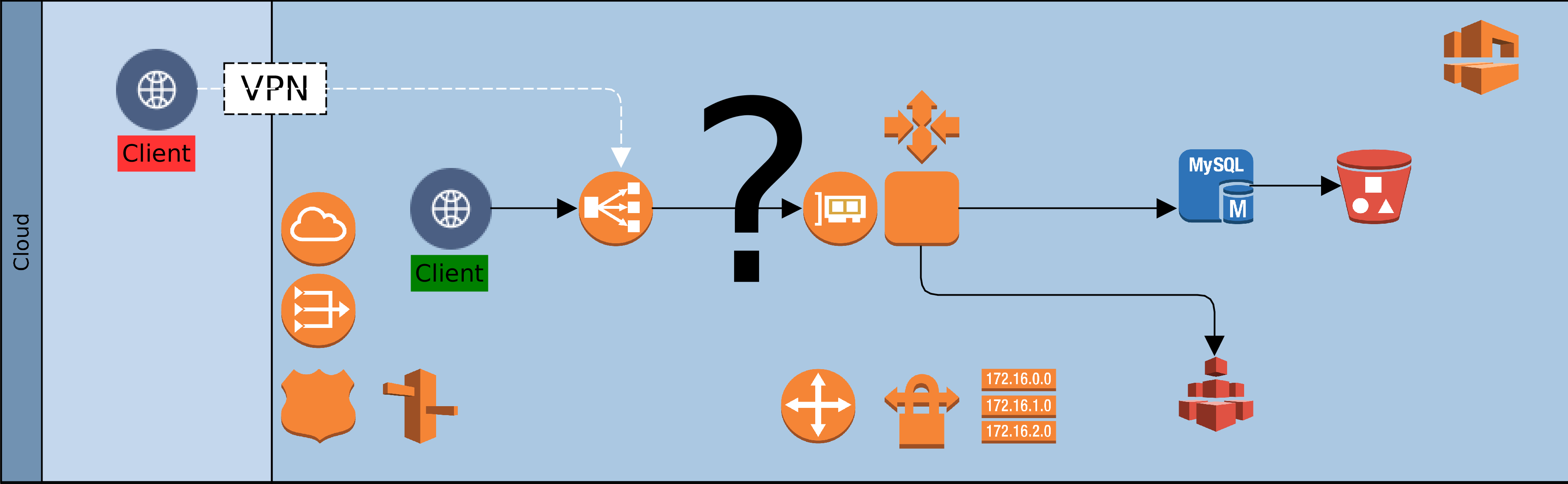
Cloud Deployment Design
Cloud Chaos

The Availability Index

So far we have been working forwards from an existing status quo to a target architecture. We have also adopted an exclusively technical perspective. What would be better is to take a business perspective. To approach our context top down. We should ask: what infrastructure is needed to support our business vision, now and into the near future? What level of availability is enough to provide service that exceeds client needs. In asking these questions, we encounter a new concept: “the Granularity of Perception”. This can be described as the number of microseconds, milliseconds, seconds, minutes, or more that impacts our service(s), as perceived by clients. Simply put: how slowly can we blink before our clients start to notice that our eyes have moved. As this number (granularity) increases, the required level of availability decreases. The table below provides a rough guide, with descriptions.

Availability Index Description
1 Cluster enabled, auto recovery, no fail 24×7, latency intolerant, high-frequency, geography affinity
3 Cluster enabled, auto recovery, no fail 24×7, latency intolerant, medium frequency
5 Cluster enabled, auto failover, business hours, latency tolerant, low frequency
7 Non clustered, manual failover, business hours, latency tolerant, low frequency

The goal of architects should be to design a Cloud platform that delivers a granularity that is finer than the perception of clients.  Using the table above as a guide, architects should play out scenarios with the service portfolio against each index.  Starting with the least to the highest.  Once the required availability index is determined, it should be relatively easy to identify the dimensions to support it.

Conclusion

As organisations embark on the journey of digital transformation, one early change is often Cloud adoption. This is because the Cloud provides a catalysing medium in which many solutions are easier and quicker to provision.  In moving from on-premise/data-centre resources to the Cloud, architects must resist the temptation to simply lift-and-shift.  Rather, the digital transformation journey should re-examine the fitness-for-purpose of existing solutions, platforms and infrastructure. There is a famous quote by Jack Welch, former CEO of General Electric. He said, If the rate of change on the outside exceeds the rate of change on the inside, then the end is near.. In a rapidly evolving globalised economy, business agility is becoming a precondition for survival.

The availability index is a simple, logical, technology-agnostic technique for conceptual reasoning about a Cloud landscape.  Determination of the availability index helps to reveal shared profiles for similar subsystems.  The profiles are logical and help estimate the resources required to support a genre of subsystem.  Each logical profile can then be mapped to specific Cloud infrastructure and captured as customisable templates.  The logical profiles provide architects with a starting point for solution designs.  The infrastructure templates serve as a baseline for DevOps teams.  Each artefact is likely to go through a number of evolutions.  However, it is vital that both views are kept in sync at all times.

Organisations that leverage this approach will see a marked improvement in the consistency of infrastructure designs.  Other benefits include faster turnaround of solutions, and systems that balance technical capability with business needs and aspirations. Architecture teams that leverage the availability index position their organisations for superior agility and competitiveness in the global economy.


Oyewole, Olanrewaju J (Mr.)
Internet Technologies Ltd.
lanre@net-technologies.com
www.net-technologies.com
Securing our Hybrid Cloud

Cloud Infrastructure Security

Cloud Infrastructure SecurityIn a previous article, “One thousand servers, start with one click”, I described the design and implementation of a simple hybrid-Cloud infrastructure.  The view was from a high level, and I intend, God willing, to delve into the detail in a later instalment.  Before that though, I wanted to touch on the subject of hybrid Cloud security, briefly.

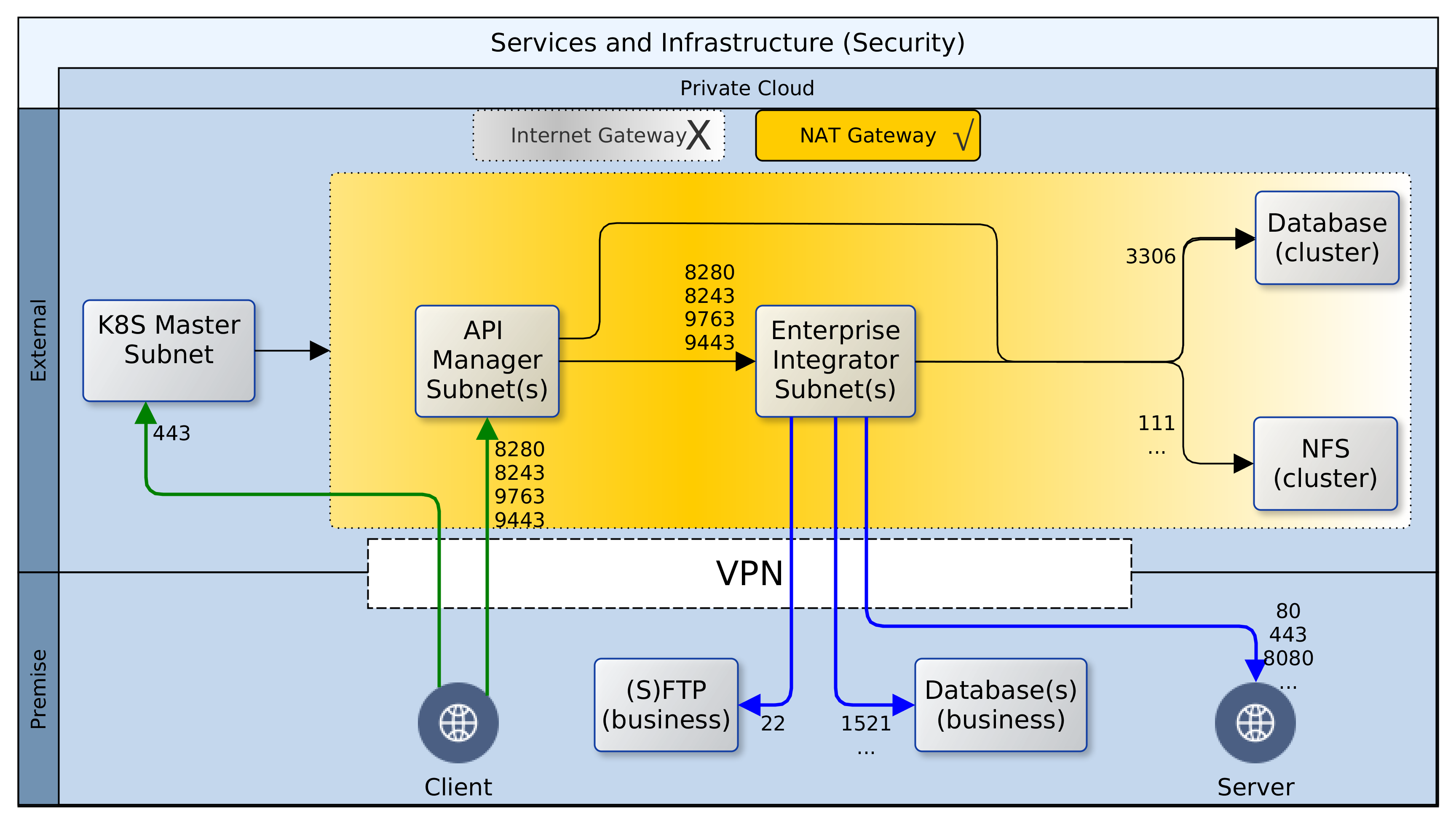
Having deployed resources in a private Cloud and on-premise, certain precautions should be taken to secure the perimeter and the green zone inside the two networks – Cloud and premise.  The diagram above paints the big picture.  It shows how, based on AWS security recommendations, minimal access/privilege is granted to each resource in the networks.  The focus here is on machine access, which is about the lowest level of security.  I will not delve into AWS policies, VPN configuration or on-premise firewall rules, as these are not black-and-white and the detail involved does not fit in with the goal for this article.

Here goes!  Reading the diagram and translating to words:

  1. It is convenient to use the Internet Gateway (public router) of your Cloud provider during development.  Once you are done with prototyping and debugging, it should be disabled or removed.  Switch to a NAT gateway (egress only router) instead.  Your servers can still connect to the outside world for patches, updates, etc. but you can control what sites are accessible from your firewall.  Switching to a NAT gateway also means that opportunist snoopers are kept firmly out.
  2. Open up port 443 for your Kubernetes (K8S) master node(s) and close all others – your cluster can even survive without the master node, so don’t by shy, lock it down.  Should the need arise, it is easy to temporarily change Cloud and premise firewall rules to open up port 22 (SSH) or others to investigate or resolve issues.  Master nodes in K8S master subnet should have access to all subnets within the cluster, but this does not include known service ports for the servers or databases.
  3. While your ESB/EI will have several reusable/shared artefacts, the only one that are of interest to your clients (partners) are the API and PROXY services.  For each one of these services, a Swagger definition should be created and imported into the API Manager (APIM).  All clients should gain access to the ESB/EI only through the interfaces defined in the APIM, which can be constrained by security policies and monitored for analytics.  Therefore, the known service access ports should be open to clients on the APIM, and as with the K8S master, all other ports should be locked down.
  4. Access to the known service ports on the ESB/EI should be limited to the APIM subnet(s) only, all other ports should be closed.
  5. The Jenkins CI/CD containers are also deployed to the same nodes as the ESB/EI servers, but they fall under different constraints.  Ideally, the Jenkins server should be closed off completely to access from clients.  It can be correctly configured to automatically run scheduled and ad-hoc jobs without supervision.  If this is a challenge, the service access port should be kept open, but only to access from within the VPN, ideally, a jump-box.
  6. Access to the cluster databases should be limited to the APIM and ESB/EI subnets only, and further restricted to known service ports – 3306 or other configured port.
  7. Access to the cluster NFS should be limited to the APIM, ESB/EI, and K8S-master subnets only, and further restricted to known service ports – 111, 1110, 2049, etc., or others as configured.
  8. On-premise firewall rules should be configured to allow access to SFTP, database, application and web-servers from the ESB/EI server using their private IP addresses over the VPN.
  9. Wherever possible, all ingress traffic to the private Cloud should flow through the on-premise firewall and the VPN.  One great benefit of this approach is that it limits exposure; there are fewer gateways to defend.  There are costs though.  Firstly, higher latencies are incurred for circuitous routing via the VPN rather than direct/faster routing through Cloud-provider gateways.  Other costs include increased bandwidth usage on the VPN, additional load on DNS servers, maintenance of NAT records, and DNS synchronisation of dynamic changes to nodes within the cluster.
  10. ADDENDUM: Except for SFTP between the ESB/EI server and on-premise SFTP servers, SSH/port-22 access should be disabled.  The Cloud infrastructure should be an on-demand, code-driven, pre-packaged environment; created and destroyed as and when needed.

And that’s all folks! Once again, this is not an exhaustive coverage on all the aspects of security required for this hybrid-Cloud.  It is rather a quick run-through of the foundational provisions.  The aim being to identify a few key provision that can be deployed very quickly and guarantee a good level of protection on day one.  All of this builds on a principle adopted from AWS best practise. The principle states that AWS is responsible for the security of the Cloud while end-users are responsible for security in the Cloud. The end-user responsibility of Cloud security begins with another principle: access by least privileges. This means that for a given task, the minimum privileges should be granted to the most restricted community to which one or more parties (man or machine) is granted membership.


Oyewole, Olanrewaju J (Mr.)
Internet Technologies Ltd.
lanre@net-technologies.com
www.net-technologies.com
Mobile: +44 793 920 3120

1000 Cloud Servers: Start With One Click

[Hybrid] Cloud Infrastructure

Cloud and Open Source

The arrival of Cloud providers and Infrastructure-as-a-Service (IaaS) has opened up options and possibilities for solution architects.  Our company is working with a client on a major transformation initiative. Leveraging Cloud IaaS and open-source integration platforms, together we have explored options, built competence, and delivered incremental solutions while keeping costs to a minimum.  Without Cloud IaaS and open-source this freedom of expression in solution architecture would have been impossible.  Just imagine justifying a multi-tier, multi-server solution to the CFO when one of the key drivers has been cost control!


The Basic Idea

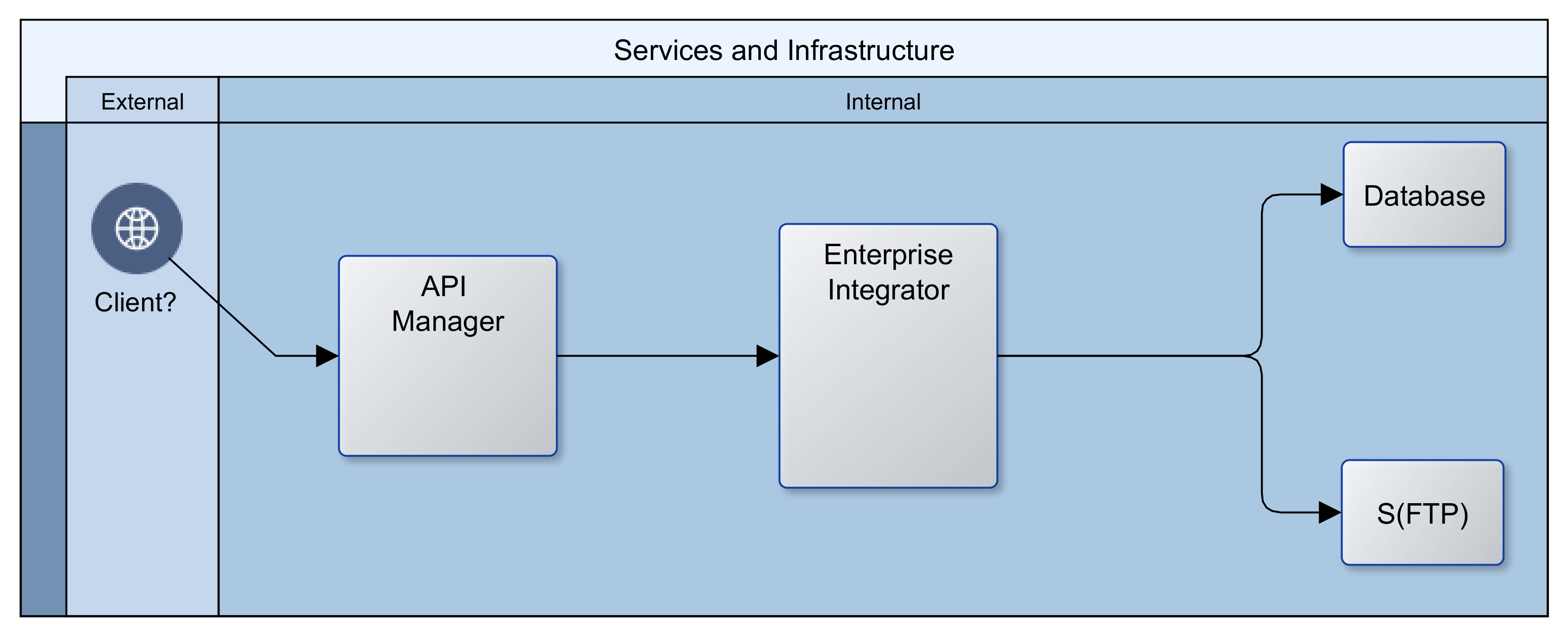
In its most primitive expression, our client wanted a public Application Program Interface (API) layer to abstract access to an Integration layer, which in turn connected with all their internal repositories and partner systems to provide services.  The image that follows provides an illustration.  It appears quite straightforward and simple.
DraftInfrastructure

The API layer provides a simple Representation State Transfer (REST) interface as well as security.  It also maintains logs that can be analysed for insights into client behaviour and the usage/performance of services.  The Integration layer serves as an Enterprise Service Bus (ESB), connecting to databases, FTP and/or file servers, as well as internal and partner web services.  In addition, it manages the interactions between all participating systems in the enterprise and ensures that valuable services are made available to the API layer.


Enter Cloud (AWS/Azure) and Open Source (WSO2)

The traditional route would have been to procure/secure access to servers in a data-centre or in-house server-room and buy licenses from a vendor.  That would have meant a lead time of several weeks or months, to negotiate the price of licenses and consultancy, arrange for servers and networking, and to secure and disburse requisite financing.  With Cloud and open-source software, upfront costs were near-zero.  The greatest resource demand was the effort required to architect the Cloud infrastructure and to create the code to build, populate and operate it.


Building the Foundation

There were many options for building the networking and computing instances.  We chose Kubernetes.  Kubernetes is well established and provides abstractions that make it easy to switch Cloud providers.  Using the analogy of a house for illustration; Kubernetes builds the shell of the house, setting up the rooms, corridors, and spaces for windows and doors.  It keeps a record of each component, and notifies all other components if there has been a change to any one of them.  In our use case, Kubernetes creates a private network in the Cloud (cluster), adds compute-instances, load-balancers, firewalls, subnets, DHCP servers, DNS servers, etc. Kubernetes also provides a dynamic registry of all these components that is kept up to date with any changes in real time.


The First Change: Redundancy

In the past, vertical scaling with large singleton servers was standard.  These days, horizontal scaling with smaller machines (compute instances) that adjust to changing needs is the norm.  This new approach also provides fail safety.  If one machine fails, there will be other(s) to take up the load. Fortunately this is a core feature of Kubernetes.  The cluster monitors itself to ensure that all the declared components are kept alive.  If/when a component fails, the management services within the cluster ensure that it is replaced with an identical component.  For this reason, rather than have one instance of each component, two or more are created and maintained.


The Second Change: Dynamic Delivery

We could have chosen to install all of our technology stack (software) on each compute instance on creation.  That would be slow though, and it could mean that the instances would need to be restarted or swapped-out more often as memory and/or disk performance degrade.  Instead of that, we used Docker to build Containers that are delivered to the instances. The Docker Containers borrow memory, CPU and other resources from the compute instance at the point of deployment.  Containers can be swapped in and out, and multiple Containers can be run on the same compute instance.  When a Container is stopped or removed, the block of borrowed resources are returned to the compute instance.   A Container can be likened to a prefabricated bathroom; it is built offsite and plumbed in at delivery.  Unlike a technology stack that is built from scratch over minutes or hours, a Container is usually ready for access within a few seconds/minutes of its deployment.
VMInfrastructure


Implicit Change: Clustering

When more than one instance of a genre component is running at the same time, the complement of all is referred to as a cluster.  Components running in a cluster have peculiar needs; one of which is the sharing of state (status).  State is a snapshot of the world from the computer’s perspective.  In a cluster, all component instances must share the same configuration and operate on the same data always.  To facilitate this, we introduced two repositories.  A Network File System (NFS) for sharing configuration details, and a database for sharing operational data.  Kubernetes does not create these resources.  We used Terraform, another abstraction technology, to create the NFS and a replicated multi-zone database.  Terraform creates these in two private subnets within the private network created by Kubernetes.  Having created the NFS and database though, there was a need to configure and populate them with necessary data upfront.  While Terraform could be manhandled to achieve this, it is not really it’s raison detre.  Another tool is more suited to operating at a fine detail on remote machines: Ansible.  We created Ansible playbooks to configure users, directories and files on the NFS and to create instances, users and tables in the database.


Implicit Change: Discovery

The next challenge that our architecture threw up was discovery.  Within our network, there was an API layer and an EI layer.  In each of these layers, there could be several compute instances, and on each compute instance there could be one or more Docker Containers.  Beyond the API and the EI layers, there were also databases and a network file system.  How would clients or our platform gain access to our components, and how would the machines in one layer find those in another layer?  The Kubernetes configuration includes ClusterIP services that provide a single DNS name that resolves to all the compute instances for a given component.  For example, any API Container could be reached using a DNS name such as: cnt.api.example.com.  Clients of our platform could therefore use a DNS name to connect to an API Container, and any API Container could likewise use a single DNS name to communicate with a Docker Container in the EI layer.  Both the API and EI layers use a DNS name to communicate with the NFS and the database.  The IP address of the underlying components might change, but the DNS name is constant for the life of the platform, giving ease of discovery and stability.


Tying it all Up

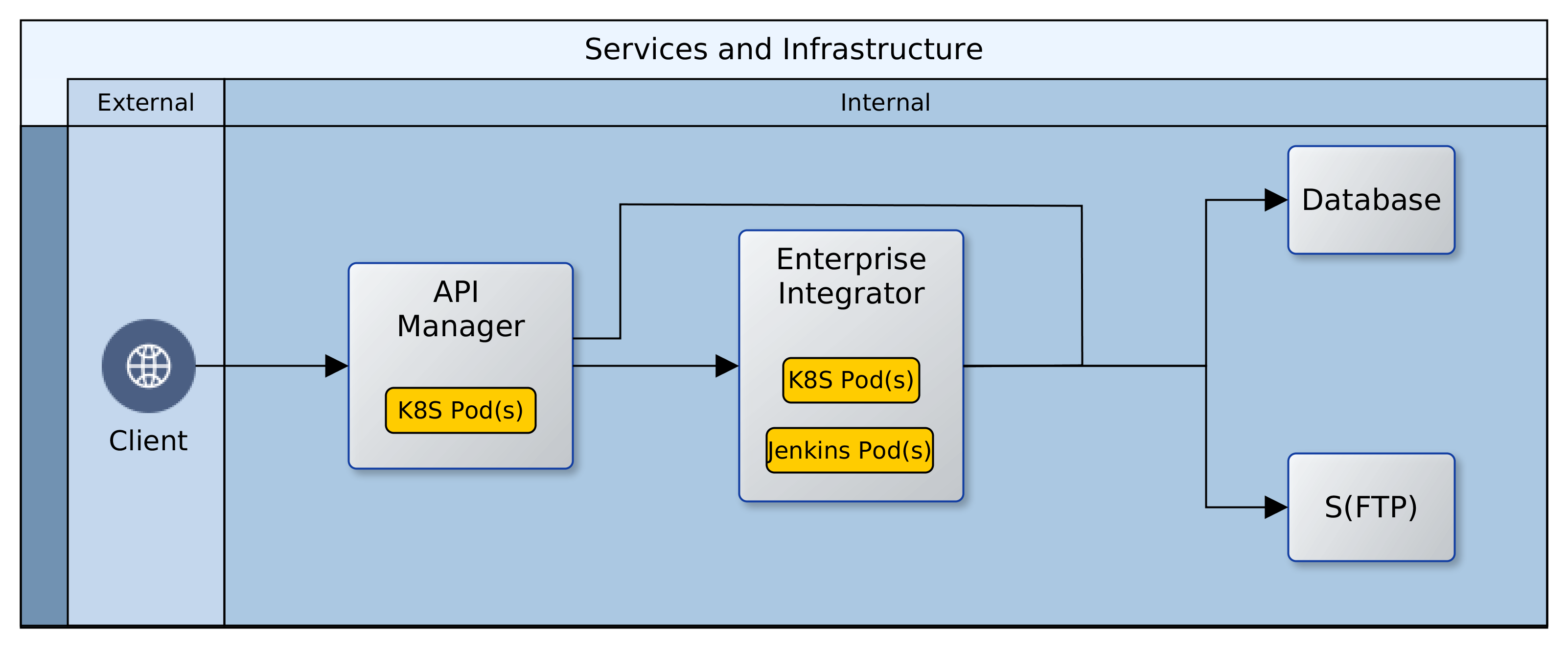
It is all well and good that the components in the Cloud are in place and can talk with each other.  However, most of our operational systems are still on-premise; how do we join things up?  We created a VPN connection between the network in the Cloud and our on-premise network and set up Firewall rules to allow access to and from the Cloud.  The ClusterIP services were also revised to permanently maintain two static IP addresses.  This makes it easy to integrate them with on-premise DNS servers and thereby open them up to access from clients.  Below is an image that shows what it all looks like.
[Hybrid] Cloud Infrastructure

The Thousand Servers

All of these components, configurations, and customisations have been documented as scripts, configuration files and resources. The creation of a Cloud environment is reduced to running a script with two parameters: the name of the environment and the desired Cloud subnet.  By integrating this script into an on-premise CI/CD server, it is now possible to spin up as many Cloud environments as we like; at the click of a button.

All this is quite high-level and simplified; in the next instalment (One Thousand Servers: Start with a Script), I intend to drop down to eye-level and throw up some of the details of how we implemented all of this.  Watch this space for the activation of link above.


Oyewole, Olanrewaju J (Mr.)
Internet Technologies Ltd.
lanre@net-technologies.com
www.net-technologies.com
Mobile: +44 793 920 3120

Factory Approach to Service Engineering – Preamble

Machine Keyboard Code

World of Perspectives

We all see the world from different perspectives, and the sum of perspectives help us to get a better/fuller understanding of our world.  In this article, we share a perspective on engineering services for business.  This perspective can be summarised as: Intelligent Laziness – strategies to achieve equal or better productivity with equal or less effort and minimal stress. To illustrate how we try to achieve this, we will use five metaphors:

  • Factory
  • Pattern
  • Framework
  • Process
  • Service

PowerPoint Summary: A Factory Approach to Service Engineering

The Factory – First Glance

When people think of factories, they imagine the primitive/simple product-focussed line that spews out large numbers of identical, low-value items.
http://www.verbolt.co.za/company-home.htm
But there is another perspective; the advanced/composite service-focussed systems that create a few bespoke high-value units to specific customers.
http://www.orangecountychoppers.com/
There are similarities, in that both are repetitive and they both transform inputs to outputs. But there are significant differences too.  The primitive factory involves lower risk, and less complexity whilst the advanced factory multiplies risk due to composition and customisation.  There is a direct relationship between value and complexity, and it is often the case that the advanced factory uses outputs from primitive factories.

But factories occur in software engineering too, and the underlying principles apply here too.  Whereas it is common to talk of dichotomy in software engineering: is it a science or an art?  Software factories do not suffer such ambiguity.  For every factory, whether hardware or software, two principles always apply:

  • The outcomes are predictable
  • The process is repetitive

Careful study of any system reveals re-occurring things/trends the production of which can be achieved with the factory principles.  This is equally true in a McDonalds restaurant as in a Rolls-Royce workshop. This is also true in software engineering, especially service engineering.

The Pattern

The re-occuring things/trends in a factory are patterns.  The predictability of the output of a factory and the fidelity of repetition depend on patterns.  Patterns are fundamental to factories.  In a factory, there is a need to understand what is to be produced and the patterns that are involved in its production.  Each pattern is a kind of template.  Given certain input and application of the template, a given output is guaranteed.  A factory is likely to involve mastery of one or more patterns, depending on the type of factory.  Fewer patterns generally reflect superior understanding of the problem domain.  However, some patterns go through special evolution (exaptation) and could become the focus of a factory in their own right.

The Framework

The collection of patterns required to create a given output can be described as a framework.  A good analogy is a box of Lego.  It is a composite of patterns, which can be put together to create the structure illustrated on the box/packaging.  The framework identifies all requisite patterns for a given output, and usually in a given technical/business context.  Each pattern in a framework form synergies and are known to be beneficial in the specified context; examples of frameworks include building regulations (hardware) or Oracle AIA (software).

The Process

Of course having all the pieces of a Lego is insufficient to construct the picture on the box.  The process elevates the framework from static to dynamic.  The process describes how the patterns in a framework are to be sequenced and aggregated in a way that delivers synergy and the best output.  The framework is a snapshot, whereas the process describes a flow from conception to completion.  For business services, the process is the first point where IT and business meet.  The process shows how value can be created while hiding (abstracting) the taxonomy/ontology of patterns and the framework(s) employed.

How does all of this come together, especially in our daily lives as software engineers serving businesses?  And how does this help our clients (the business) better compete?  Join me in the next instalment where I will be looking at the benefits, business connection, and potential future impact.


Oyewole, Olanrewaju J (Mr.)
Internet Technologies Ltd.
lanre@net-technologies.com
www.net-technologies.com
Mobile: +44 793 920 3120

Factory Approach to Service Engineering – Business

Business Service Factory

From Technology to Business

In a previous article, I looked at how some metaphors can be used to understand the engineering of software (services).  Of the five listed below, I introduced the first four.

  • Factory
  • Pattern
  • Framework
  • Process
  • Service

The first three have a clear technical focus; the fourth is a gateway between the technical world and the business world.  The fifth though is where the business focus becomes paramount.

IT is an enabler – no one invests in technology for itself, rather it is for what IT can do for business.  The service is the business perspective on the process.  It focusses on how all those patterns and frameworks abstracted within those processes can be put to work for business. But even business is not without patterns!  Every business operates in a sector, and belongs to a genre.  For every business genre, there are certain must-have competencies common to all participants, as well as some differentiators that are peculiar to some players.  The build up from our patterns to the processes must be honed to effectively serve out clients; the business, who themselves have clients: the buck-paying end-users.


The Service as Business Nexus

The reliability, efficiency and quality of our technical processes must feed into our business clients and aid their agility.  A business that is supported by factories at different levels (pattern, framework, process) is more able to adapt to a changing environment.  Such businesses are able to recombine solutions at different levels of granularity to address emerging needs.
It is vital to make a distinction between software-engineering per se and service-engineering.  At the different levels of the vertical hierarchy of software, there are factories that have no alignment to any business whatsoever.  They are simply technology enablers.  The focus here is on services, i.e. software that is “client” driven.  In a Service Oriented Architecture (SOA) there is an intrinsic/instinctive alignment to business.  I go even further to speak of a “fundamentalist SOA“, characterised by the following principles:

  • Build Best
  • Owner-Agnostic
  • Interdependent Services
  • Service Ontology
  • Attritional Evolution

We should build on Steven Covey’s (The 7 habits of highly effective people) principle of interdependence and Steven Johnson’s (Where good ideas come from) ideas of next-adjacent, serendipity and exaptation.  Everyone should not build everything.  No one should build just for themselves.  But let every output be seen as a target (service) for the genre or sector/industry rather than the department or the company.

There are significant benefits to this mindset:

  • Cheaper solutions: due to successful scaling of a few best patterns
  • Easier, Faster: due to extreme specialisation of the most successful patterns
  • Simpler Maintenance: due to deep understanding of the pathology of the patterns
  • Fewer Faults, Quicker Fixes: due to clear modularity/decomposition of the patterns
  • Better Scalability: due to to built-in fundamental qualities of patterns
  • More/Better Output: as patterns are re-composed at higher levels of abstraction

But these kind of solutions are themselves products of a new learning.  This learning is focussed on the core nature of the problem rather than its specifics.  It is meta-learning that looks for patterns in the problem domain and then maps each to a resolver in the solution domain.  This Weltanschauung delivers, and it is an enabler for federation of output as seen in open-source software.  It is a value well demonstrated in Amazon Web Services.  Without this mindset, corporations like YouTube or DropBox would not have gotten off the ground.  With it, the evolution of novice to expert is more likely to be successful and the duration of the transform is more predictable and much shorter.  One expects that all this would also produce more of Jeff Bezos “work-life harmony” for those involved.  As well as better and cheaper output for those buck-paying clients, at all levels!

Plus ça change … ?

Computers know nothing! Deep-blue would not know how to crawl out of a pond if it fell into one. But we can teach it to.  We communicate with machines through patterns; the patterns represent an abstraction of our language and knowledge.  The patterns help us to teach machines, and thereupon to delegate to them.  Better abstraction means we can get more out of the machines. The patterns are our bridge to the nebulous machine world.

Increasing the variety and the speed at which we add abstractions will hasten the metamorphosis of ideas to reality.  Each one extends our metaphorical bridge; from the machine end to the human end.  As we do so, alterations to our present reality will emerge ever faster, as our most abstract ideas and desires are projected across bridge of abstraction into new and tangible experiences.  The foundation of all this is and will be unavoidably linked to those principles that we started with earlier: the factory, pattern, framework, process, and service.
That is my (view point) perspective.

Good day and God bless.


Oyewole, Olanrewaju J (Mr.)
Internet Technologies Ltd.
lanre@net-technologies.com
www.net-technologies.com
Mobile: +44 793 920 3120

AWS vs Oracle Cloud – My Experience

Oracle Cloud

Preamble

Having had a good impression from my use of Amazon Web Services (AWS), I decided to take a look at Oracle Cloud. AWS is of course the market leader but Oracle, Microsoft et al have joined the fray with competing services. What follows is nothing like a Gartner report, rather it is my personal experience of the Oracle and AWS services, as an end user. AWS is already well known and is perhaps the benchmark by which all others are presently measured. This article maintains that same perspective. The narrative is of my experience of Oracle Cloud and how it compares with AWS.  To keep this brief, I will only mention the cons.

Setting Up

As with every online service, Cloud or otherwise, you need to sign up and configure an account with the provider. The Oracle Cloud account set up involved more steps than the AWS. The telling difference though was in the time it took for the account to be available for use. Whereas the AWS account was all ready to go within a day, it took about 3 working days for my Oracle account.

The second difference was in communication. AWS sent me one email with all I needed to get started; Oracle sent me about 5 emails, each with useful information. I had some difficulty logging on to the Oracle service at first. But this was because I thought, wrongly, that the 3 emails I had received contained all that I needed to log in. The 4th email was the one I needed and with it in hand, login was easy and I could start using the serivces – the 5th email was for the VPN details.

Oracle Cloud Services

Having set up the account, I was now able to login and access the services. I describe my experience under four headings: user interface, service granularity, provisioning and pricing.

:User Interface

I will describe the interface usability in three aspects: consistency, latency, and reliability.  First is consistency.  On logging in to the Oracle Cloud, there is an icon on the top left hand corner that brings up the dashboard.  This is similar to AWS.  However, clicking that same button in the default, database, storage and SOA home pages results in a different list of items in the dashboard display.  This can be confusing as users may think they have done something wrong, or lost access to one of their cloud services.  The second, latency, is also a big problem with some in-page menus.  Response time for drop-down lists can be painfully slow and there is no visual indicator (hourglass) of background processing.  In extreme cases, latency becomes an issue of reliability.  There are times when in-page menus simply failed to display despite several clicks and page refreshes.

:Service Granularity

The area of concern is IaaS, and the two services I had issue with were compute and storage.  The choice of OS, RAM, CPU, etc. available when selecting a compute image is quite limited.  Mostly Oracle Linux and a chained increase in RAM and CPU specifications.  When creating storage; it appears that there is only one “online” storage class available – standard container.  The usage of the terms “container” and “application container” was a bit confusing in this context.  This is especially so when trying to create storage for a database that will be used by Oracle SOA Cloud.

:Provisioning

Provisioning is the fulfilment of the request to create a service package (IaaS, PaaS or SaaS).  The time it took to create a database (PaaS) instance was in excess of 30 minutes.  Perhaps this was due to the time of day and high concurrency.  Nevertheless, given that I could run a script to do same on my laptop within 10 minutes, one would expect equal or better from the cloud.  The delay is even longer with creation of the Oracle SOA Cloud instance; this took well over 2 hours to complete.  Scripted creation of instances would be much quicker on a modest PC.  For cloud services, images should provide even quicker initialisation of instances from templates.

:Pricing

This could be the elephant in the room.  Whereas options were few and insufficient in IaaS, the array of pricing for almost identical PaaS offerings was long and rather confusing.  Unlike AWS, there are only two schedules: hourly or monthly.  There are no options to reserve or bid for capacity.  Finally, even the lowest prices are quite high from the perspective of an SME.  The granularity of billing needs to be reduced or the composition of IaaS and PaaS should give greater flexibility.  Either way, entry prices need to be attractive to a larger segment of the market.

Summary

A great impediment to comparison is the short trial period allowed for Oracle Cloud services.  The 30 day allowance is insufficient, except for those with a prepared plan and a dedicated resource.  Such an exercise would in itself amount to no more than benchmarking, leaving little room for gaining a real feel for the services.

We should set aside the latency issues in setup, user interface and provisioning.  These are easy problems to resolve and it is likely that Oracle will fix these very soon.  The output of provisioning for Oracle-specific PaaS and SaaS services was very good and compares favourably with AWS.  One advantage of the Oracle PaaS is the simple configuration of requisite security to gain access for the first time.  This meant that the PaaS services were very quickly available for use without further tweaking of settings.  The shortcoming, as previously stated, is that provisioning can take quite a while.  Overall, the use of the Oracle PaaS was seamless and integration with on-premise resources was easy.  The only exception being JDeveloper, which could not integrate directly with Oracle SOA Cloud instances.

Competition

AWS has the benefit of early entry and has a far richer set of services.  But the feature set is not an issue since Oracle is not into Cloud as an end, but as a means to extend the availability of existing products and services.  However, even in the limited subset where there is an overlap, AWS provides finer granularity of services/features, better interface usability, and a much more alluring pricing model.

Oracle has fought many corporate and technology battles over the years.  The move to Cloud space is yet another frontier and changes will be needed in the following areas.

  • Open up the options and granularity of IaaS offerings
  • Address significant latencies in provisioning PaaS services
  • Revise the pricing model to accommodate SMEs
  • Totally refresh the flow and performance of web pages

The Cloud has arrived, like the Internet, underestimated initially, but it promises likewise to revolutionise IT.  This market will certainly benefit from competition and I surely hope that Oracle will take up the gauntlet and offer us a compelling alternative to AWS – horizontal and vertical.

God bless!

Oyewole, Olanrewaju J (Mr.)
Internet Technologies Ltd.
lanre@net-technologies.com
www.net-technologies.com
Mobile: +44 793 920 3120

A Simple DevOps Chain

Simple DevOps Chain

A Pipeline of Tasks Illustrating a Simple DevOps Chain

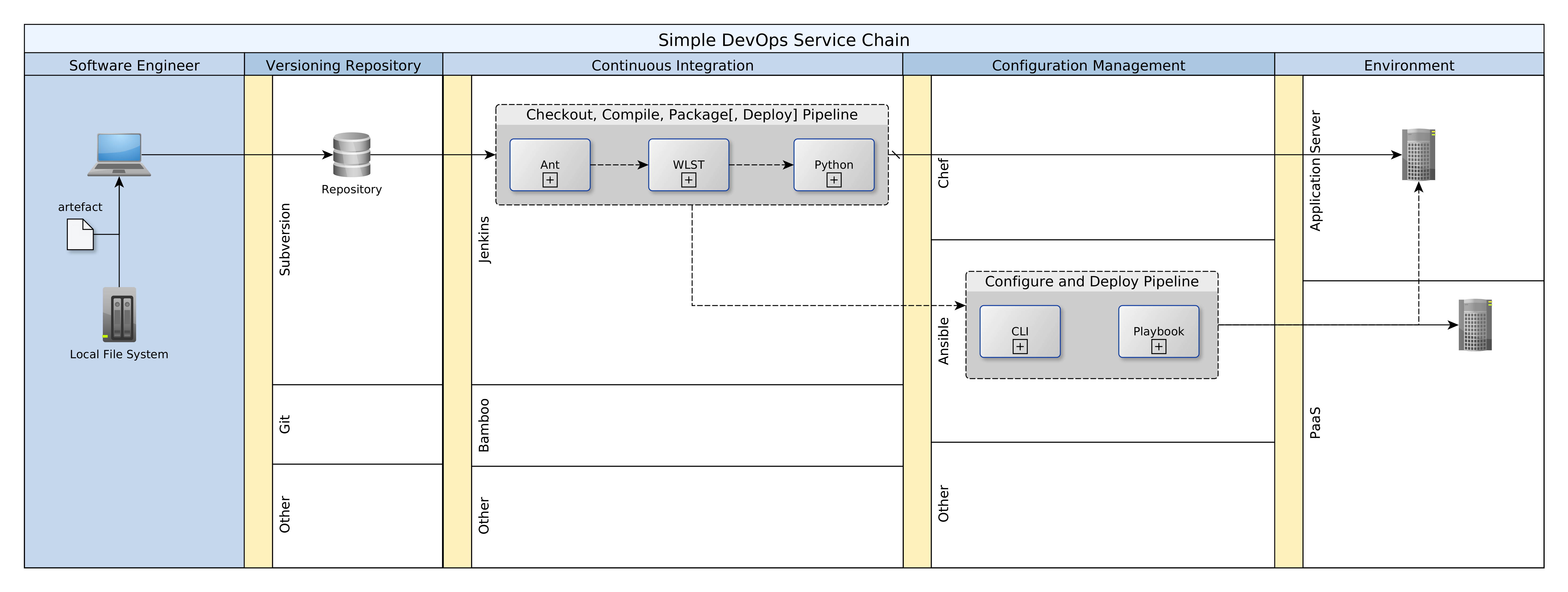
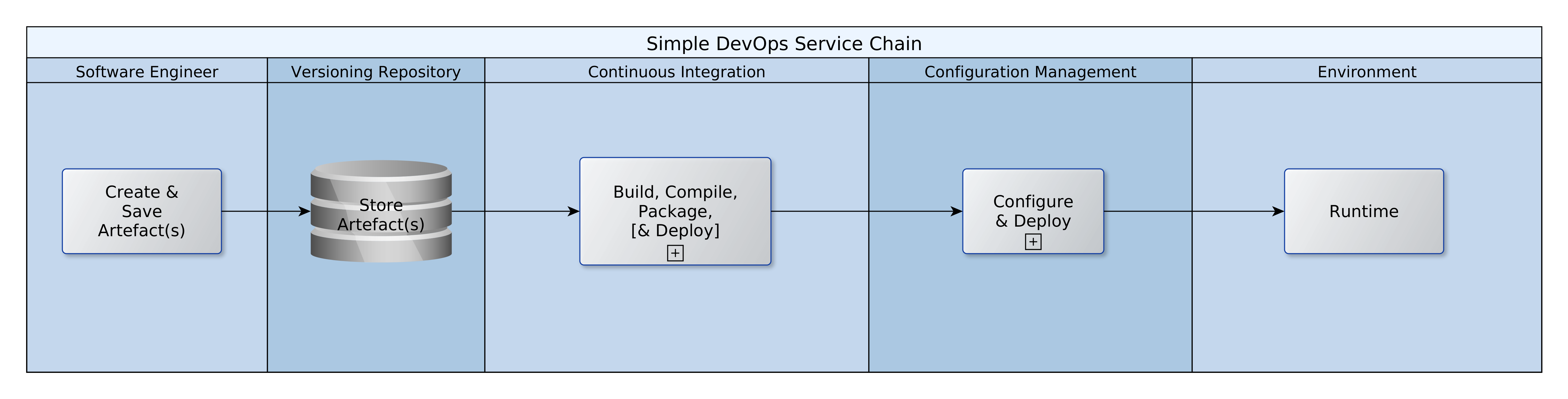
DevOps is the amalgalm of development activities and the business continuity provided by operations teams.  It unites the efforts of what are still two teams, with different competencies, into one value chain. DevOps creates and sustains a unified process for transforming technical requirements into live code in production systems.  In this article I walk through a very simple example to illustrate the key concepts and actors involved in the value chain, and how they are linked.  The diagram that follows (below) provides a quick high-level view.  This article is an adaptation for Jenkins based on a similar post for Maven.  Many examples for DevOps are based on Maven.  If you have little Maven experience or find yourself in an environment where Ant is already in use, this article will help you get  a simple DevOps started quickly.

Simplified DevOps ChainIn the sections that follow, I will be talking about each of the pools of activity in the diagram above.

Creating and Saving Artefacts

The first step of course is to create the artefacts that will power our target systems, whether DEV, TEST, UAT, or PROD.  Software engineers are the primary actors in this scope.  The term, software engineer, is used here to include developers, testers, DBAs  and operations personnel.  The term, resources, refers to any code, script, list, sheet, etc. that will either implement, support, or validate our target systems.  Software engineers will create resources on their local machines and by saving them to a repository, trigger a chain of events that will take some of those resources into production systems.

Simple DevOps Chain
There are quite a few repositories available, including Subversion, Git, etc.  In this example I have used Subversion, but the process of create, save, commit/update is pretty much the same.  The repository is at the heart of everything.  We have a rule: an artefact does not exist, unless it is saved and maintained in the repository.  Continuous integration and deployment are driven exclusively be resources in the repository.

Continuous Integration (CI)

As with the repository, there are many options; I used Jenkins.  Jenkins is used to periodically validate the status quo (code base).  It does this by a sequential process, executed on a schedule:

  1. Check out all updated artefacts
  2. Compile and/or validate the artefacts
  3. Package the compiled artefacts

The schedules for each of these steps differ, but there is a dependency from 3 to 2 and from 2 to 1.  If step 1 fails, the others are aborted, and if step 2 fails, step 3 is aborted.  The checkout is run every 15 minutes, the compile is run hourly and the package is run every other hour.  Each of these three steps are executed for the artefact groups used: MDS, OSB, BPEL.  If any of the jobs fail, the Jenkins administrator is notified by email with details about the job and optionally the log output.

Apart from the integration with Subversion via a plugin, the Jenkins service relies heavily on an Ant build file for running each of these jobs.  The flow of data/control for each job is as follows:

  1. Jenkins job is started (manually or on schedule)
  2. Jenkins invokes Shell script
  3. Shell script invokes Ant
  4. Ant executes a task/target

Three separate Ant build files for each of the artefact groups: MDS, OSB, BPEL.  This is for ease of maintenance, and because the names of the targets/tasks are the same: compile, clean, package, etc.  However, all the build files share the same property file since many of the properties are common to all builds.

Configuration Management

Once the artefacts have been packaged, they are ready for deployment.  Once again, there are a number of options. We could use Chef, Ansible, Jenkins, Puppet, Bamboo, etc..  Now, if you have to build the machine before you can deploy you are left with no choice but to use proper CD tools like Ansible, Chef, or Puppet.  In this case the platform was already available and so I used Jenkins and Ant once again.  A Jenkins job was created for deploying to target environments.  The deploy job should be scheduled for DEV (every morning) but manual for all other environments.  In addition, there should be offline governance controls over the manual deployment to non-DEV environments.

Smoke Testing

Once the artefacts are successfully deployed to the target environment, it is useful to test the services.  There are quite a few options available for testing deployed services, including JMeter, SOAP-UI, etc.  The testing could be carried out manually, managed offline, or integrated with Jenkins.

The automation of these essential tasks help to free developers from the bother of checking systems and code for breakages.  Instead, the Jenkins services continuously build and check the source code to ensure that the baseline is stable.

(Link to archive with Jenkins, Ant and shell resources: jenkins-ant archive)


Oyewole, Olanrewaju J (Mr.)
Internet Technologies Ltd.
lanre@net-technologies.com
www.net-technologies.com
Mobile: +44 793 920 3120


Impressive Amazon Web Services: First Glance

Impressive Amazon Web Services (AWS)

Amazon Web Services: Background

Amazon Web Services (AWS) have revolutionised the way we view IT provisioning.  AWS makes so many things easier, and often cheaper too.  The benefits scale from the SME right up to corporates; no segment is left out.  Complexity is abstracted away, and with a little effort, large and/or complex systems can be built with a few clicks and some configuration.

Architecture

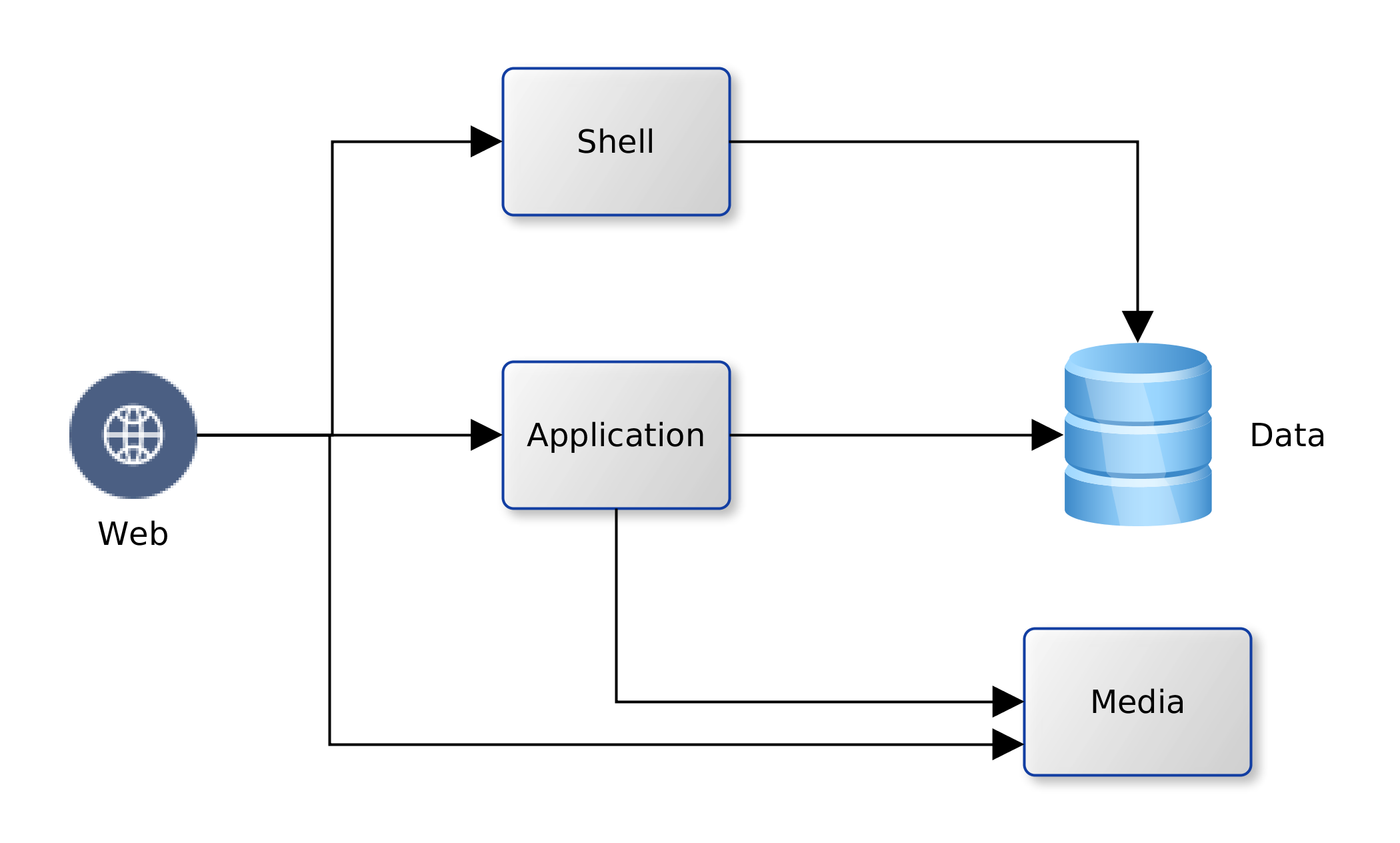
We decided to take a quick look and see just how much the AWS could offer low-budget SMEs.  Using our company’s existing platform as the subject.  We have one Oracle database and a handful of MySQL databases; an application server and a Web Server fronting for the application server and several CMS-driven sites.  The application server runs Java web services that use data from the Oracle database.  The web server hosts the pages for the Java application.  It also servers a number of WordPress/PHP sites that run on data from the MySQL databases.  The logical view is illustrated in the diagram below:
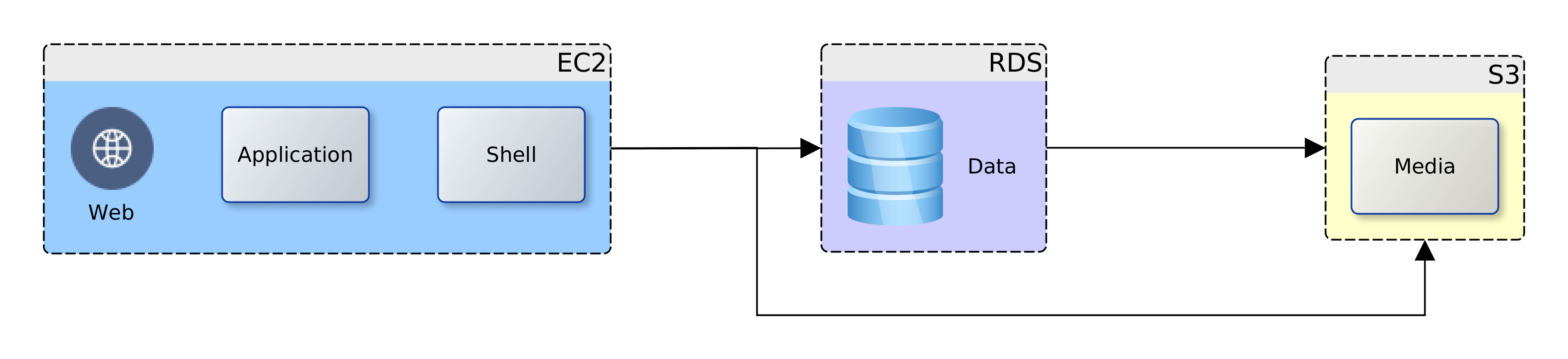
AWS nettech Logical ViewWe could map the logical view to one-to-one service units in AWS, or rationalise the target resources used.  AWS provides services for computation for web and application (EC2) Shell scripting (OpsWorks), data (RDS) and static web and media (S3), and other useful features; Elastic IP, Lambda, IAM.  So, we have the option to map each of the logical components to an individual AWS service.  This would give us the most flexible deployment and unrivalled NFR guarantees of security, availability and recoverability.  However, there would be a cost impact, increased complexity, and there could be issues with performance.

Solutions

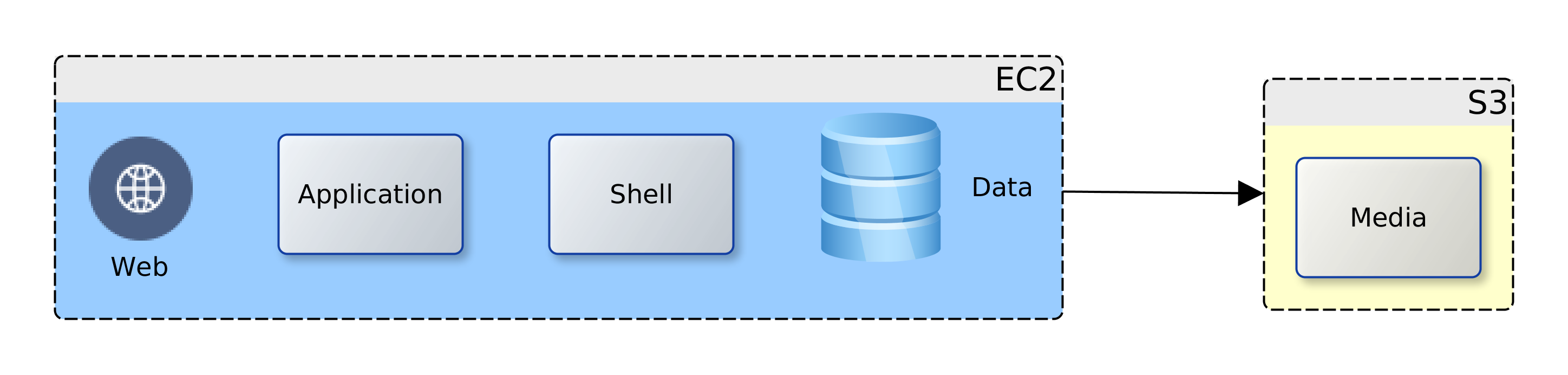
Going back to our business case and project drivers; cost reduction is highlighted.  After some consideration two deployment options were produced (below), and we therefore chose the consolidated view. The Web, application and data components were targeted at the EC2 instance as they all require computation facilities.  All the media files were targeted at the S3 bucket.  The database data files could have been located on the S3 bucket but for the issue of latency, and costs that would accumulate from repeated access.

AWS nettech physical viewThe media files were targeted to the S3 bucket due to their number/size (several Gbs).  The separation ensures that the choice of EC2 instance is not unduly influenced by storage requirements.  The consolidated view allows us to taste-and-see; starting small and simple.  Over time we will monitor, review and if need be, scale-up or scale-out to address any observed weaknesses.

Migration

Having decided on the target option, the next thing was to plan the migration from the existing production system.  An outline of the plan follows:

  1. Copy resources (web, application, data, media) from production to a local machine – AWS staging machine
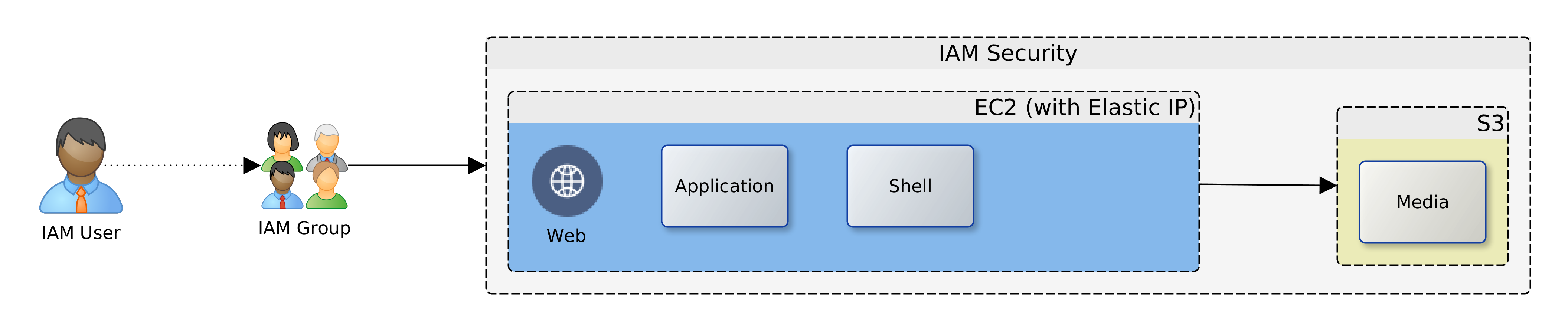
  2. Create the target AWS components  – EC2 and S3, as well as an Elastic IP and the appropriate IAM users and security policies
  3. Transfer the media files to the S3 bucket
  4. Initialise the EC2 instance and update it with necessary software
  5. Transfer the web, application and data resources to the EC2 instance
  6. Switch DNS records to point at the new platform
  7. Evaluate the service in comparison to the old platform

AWS nettech physical view III

Implementation

The time arrived to actualise the migration plan.  A scripted approach was chosen as this allows us to verify and validate each step in detail before actual execution.  Automation also provided a fast route to the status quo ante, should things go wrong.  Once again we had the luxury of a number of options:

  • Linux tools
  • Ansible
  • AWS script (Chef, bash, etc.)

Given the knowledge that we had in-house and the versatility of the operating system (OS) of the staging machine, Linux was chosen.  Using a combination of AWS command line interface (CLI) tools for Linux, shell scripts, and the in-built ssh and scp tools the detailed migration plan was to be automated.  Further elaboration of the migration plan into an executable schedule produced the following outline:

  1. Update S3 Bucket
  2. Copy all web resources (/var/www) from the staging machine to the S3 bucket
  1. Configure EC2 Instance
  2. Install necessary services: apt update, Apache, Tomcat, PHP, MySQL
  3. Add JK module to Apache, having replicated required JK configuration files from staging machine
  4. Enable SSL for Apache … having replicated required SSL certificate files
  5. Fix an incorrect default value in Apache’s ssl.conf
  6. Configure group for ownership of web server files www
  7. Configure file permissions in /var/www
  8. replicate MySQL dump file from staging machine
  9. Recreate MySQL databases, users, tables, etc.
  10. Restart services: MySQL, Tomcat, Apache
  11. Test PHP then remove the test script …/phpinfo.php
  12. Install the S3 mount tool
  13. Configure the S3 mount point
  14. Change owner, permissions on the S3 mounted directories and files – for Apache access
  15. Replicate application WAR file from staging machine
  16. Restart services: MySQL, Tomcat, Apache
  1. Finalise Cutover
  2. Update DNS records at the DNS registrar and flush caches
  3. Visit web and application server pages

Anonymised scripts here: base, extra

A few observations are worthy of note, regarding the use of S3.  AWS needs to make money on storage.  It should therefore not be surprising that updates to permissions/ownership, in addition to the expected read/write/update/delete, count towards usage.  Access to the S3 mount point from the EC2 instance can be quite slow.  But there is a workaround: use aggressive caching in the web and application servers.  Caching also helps to reduce the ongoing costs of repeated reads to S3 since the cached files will be hosted on the EC2 instance.  Depending on the time of day, uploads to S3 can be fast or very slow.

Change Management

The cut-over to the new AWS platform was smooth. The web and application server resources were immediately accessible with very good performance for the application server resources.  Performance for the web sites with resources on S3 was average.  Planning and preparation took about two days.  The implementation of the scripts for migration automation took less than 30 minutes to complete.  This excludes the time taken to upload files to the S3 bucket and update their ownership and permissions.  Also excluded is the time taken to manually update the DNS records and flush local caches.

Overall, this has been a very successful project and it lends great confidence to further adoption of more solutions from the AWS platform.

The key project driver, cost-saving, was realised, with savings of about 50% in comparison with the existing dedicated hosting platform.  Total cost of ownership (TCO) improves comparatively as time progresses.  The greatest savings are in the S3 layer, and this might also improve with migration to RDS and Lightsail.

In the next instalment, we will be looking to extend our use of AWS from the present IaaS to PaaS.  In particular, comparison of the provisioning and usability of AWS and Oracle cloud for database PaaS.  Have a look here in the next couple of weeks for my update on that investigation.


Oyewole, Olanrewaju J (Mr.)
Internet Technologies Ltd.
lanre@net-technologies.com
www.net-technologies.com
Mobile: +44 793 920 3120